

👋 Hi, it’s Kunal, and welcome to the Insider Growth Group newsletter, our bi-weekly deep dive into the hidden playbooks behind tech’s fastest-growing companies.
Our mission is simple: We help you create a roadmap that boosts your key metrics, whether you're launching a product from scratch or scaling an existing one.
What We Stand For
Actionable Insights: Our content is a no-fluff, practical blueprint you can implement today, featuring real-world examples of what works—and what doesn’t.
Vetted Expertise: We rely on insights from seasoned professionals who truly understand what it takes to scale a business.
Community Learning: Join our network of builders, sharers, and doers to exchange experiences, compare growth tactics, and level up together.
Siri could book restaurants, find movies, and hail taxis back in 2010. But getting people to come back was a much harder problem.
The technology was impressive. The user behavior told a different story.
When someone’s first question failed, they often never tried again. And even when Siri worked, usage peaked on weekends and dropped during the week. People were fascinated by what Siri could do. But that didn’t mean they knew how to use it or had a reason to make it a daily habit.
Today’s AI companies are facing a remarkably similar challenge.
ChatGPT, Claude, and the growing wave of personal AI agents can accomplish increasingly sophisticated tasks. Yet users still have to figure out what to ask, which capabilities to trust, and whether using AI is actually easier than their existing workflow.
The paradox: Making an AI assistant more capable doesn’t automatically make it more useful, trustworthy, or habit-forming.
Siri confronted these problems more than a decade before the current AI boom.
Launched as a standalone iPhone app in February 2010, Siri could interpret natural-language requests and connect users to services for restaurants, movies, transportation, and more. Apple acquired the company just two months later and integrated Siri into the iPhone 4S in 2011.
But building the technology was only half the battle.
The team still had to solve three fundamental growth problems: How do you get users to ask a question the product can actually answer? How do you recover when the assistant gets something wrong? And how do you turn an impressive novelty into something people reach for every day?
The answers are surprisingly relevant to the next generation of AI products.
Introducing: Mohammed “Mo” Abdoolcarim

Back in 2008, Mohammed “Mo” Abdoolcarim joined Siri as one of its earliest employees and became its first product manager.
Mo helped build Siri from an ambitious startup into a product that would eventually reach millions of iPhone users.
He was there when Steve Jobs and Scott Forstall visited Siri’s small San Jose office following Apple’s acquisition. He subsequently worked with Jobs and the Apple team to bring Siri to the iPhone 4S and tackle the challenges of introducing an entirely new way to interact with technology.
Today, Mo is the co-founder and CEO of onBeacon, an AI-powered growth platform that helps product teams identify friction in user experiences, uncover activation and conversion opportunities, and develop testable product improvements.
In other words, he’s spent much of his career working on a deceptively difficult problem: turning powerful technology into products people actually use.
For this deep dive, Mo takes us behind the scenes of three product-growth decisions from Siri’s early days - what wasn’t working, what the team changed, and what today’s AI founders can learn.
Case Study #1: Siri Improved Activation by Teaching Users What to Ask
Growth lever: Activation and first successful task completion
The problem: Users were failing before they experienced the product’s value
Traditional software makes its capabilities visible.
If you open a project management app, you’ll see tasks, projects, and buttons to create something. If you open an analytics product, you’ll probably find dashboards, charts, and filters.
Even without a tutorial, the interface provides clues about what the product can do. Conversational interfaces are fundamentally different.
When someone opened Siri, they encountered a text or voice interface that invited them to make a request. But unlike a traditional application, the available functionality wasn’t immediately obvious.
That created a serious mismatch between user expectations and actual product capabilities.
Someone might assume Siri could answer any question, understand any command, or perform any action. In reality, early Siri could only recognize certain types of requests and fulfill them through predefined workflows and third-party integrations. For example, it could find restaurants through services like OpenTable or look up movie showtimes, but ask it something outside those supported use cases, and it often struggled. The challenge was that users had no way of knowing what Siri could actually handle until they tried.
This meant that users could fail before they had ever experienced anything useful.
Imagine a user opening Siri, asking an unsupported question, getting an unhelpful response, and closing the app.
From the user’s perspective, Siri didn’t work. From the team’s perspective, the user had never reached the part of Siri that worked.
The contributor described a particularly important behavioral observation: users whose first request failed often didn’t try again.
That suggested that the first successful task was a critical activation event.
The team didn’t just need people to open Siri or submit a question. It needed them to make a request Siri could fulfill and experience the value of doing something through natural language.
The hypothesis was that if the team could guide users toward specific, relevant requests that Siri could reliably complete, more people would experience a successful first interaction and continue using the product.
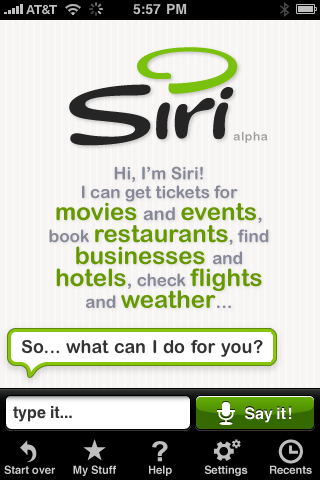
Caption: The original Siri app, before contextual suggestions. Users got an open prompt and had to guess what Siri could do.
The solution: Replace an open-ended interface with contextual guidance
The team designed a welcome experience that fundamentally changed what happened before a user made their first request.
Instead of leaving someone to invent a question, Siri greeted them with concrete examples of what they could ask.
These examples focused on recognizable, useful outcomes: checking whether it would rain, finding movie showtimes, locating a restaurant, or arranging transportation.
The team wasn’t simply advertising features. It was shaping the user’s first request toward an outcome the product could successfully deliver.
The welcome experience also prioritized completing one meaningful task rather than overwhelming users with the entire breadth of Siri’s capabilities.
A user didn’t need to understand every available integration. They needed to ask something, get a useful answer, and recognize that Siri had saved them effort.
That was the moment the team wanted to create.
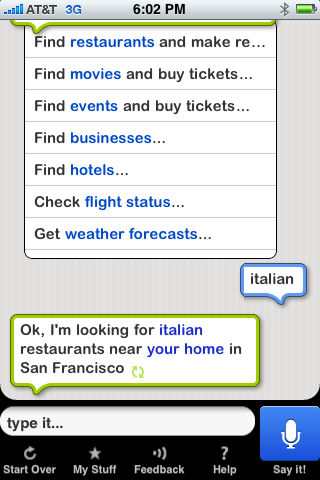
Caption: Siri’s onboarding experience gave new users concrete examples of supported requests, reducing the need to discover capabilities through trial and error.
But the team went a step further. Rather than showing the same examples regardless of context, Siri personalized suggestions based on the time of day.
In the morning, users might see suggestions related to weather, traffic, or their calendar. In the evening, examples shifted toward finding restaurants, checking movie showtimes, or setting reminders.
This was an important behavioral insight. A request such as “Find a restaurant nearby” might be useful at 7 p.m. but far less relevant to someone opening Siri before work.
Context didn’t just make the product feel personalized. It increased the likelihood that a suggested request reflected something the user genuinely wanted to accomplish.
Instead of asking users to imagine a possible use case, Siri presented a plausible use case in the moment.
The impact: Better questions led to more successful first interactions
Siri defined a successful first interaction two ways, and the results split.
Getting an answer. For informational requests like “Is Spider-Man playing this weekend?”, the new onboarding pushed success past half of users. More than 50% of them got an answer that satisfied what they were looking for. On mobile, Siri got them there faster than a Google search.
Completing a transaction. For the OpenTable flow, where success meant a completed booking, the lift was much smaller: from roughly 5% to 9%. Those bookings earned Siri about $200 a week in referral fees, enough to fund the team’s Friday pizza.
The gap wasn’t technical. People already had a default for getting a table: they called the restaurant. Changing that habit takes time.
Onboarding fixed the first problem but not the second. Better examples can steer users toward questions your product answers well. They can’t make users abandon a behavior that already works for them.
For AI products, activation and behavior change are different problems. Contextual onboarding can get users to a successful first answer quickly. Getting them to hand off a real transaction, like booking, buying or sending, means beating what they already do.
What today’s AI product teams can steal
Experiment: Replace generic onboarding prompts with contextual suggestions that lead to successful first tasks.
Imagine you’re building an AI analytics assistant. Instead of showing every new user generic prompts like “Analyze my data,” personalize suggestions based on what they’ve already done.
For example, someone who just connected a revenue database might see “What caused the biggest revenue change last month?” while someone who uploaded a customer CSV might see “Which customers are most likely to churn?”
The goal isn’t to get users to submit more prompts. It’s to guide them toward requests your product can reliably fulfill.
How to test it: Run an A/B test comparing generic starter prompts (control) against contextual suggestions based on connected data and user activity (treatment).
Primary metric: First meaningful task completion within 24 hours.
Secondary metrics: Unsupported-request rate, prompt reformulation, time to first value, and D7 retention.
What to watch for: More prompts don’t necessarily mean better activation. If users submit more requests but aren’t successfully completing valuable tasks, you’ve increased engagement without delivering value.
The takeaway: The most important AI onboarding metric isn’t whether users submit their first prompt. It’s whether that first prompt actually works.
Case Study #2: Siri Protected Retention by Making Failure Part of the Product Experience
Growth lever: Trust, failure recovery, and retention
The problem: A confident wrong answer could destroy trust
Every AI system makes mistakes. But conversational interfaces create a different relationship between the product and the user.
When a traditional application fails, the error is often obvious. A button doesn’t work, a page doesn’t load, or an action produces an error message. An assistant can fail more subtly.
It can misunderstand what you’re asking, incorrectly infer your intent, or provide a confident answer that sounds helpful but is wrong. That creates a different kind of frustration.
The user isn’t simply encountering a software bug. They’re interacting with something that appears to understand them but doesn’t. The early Siri team saw this behavior firsthand.
According to Mo, a single bad response could be enough to discourage someone from using Siri again. Over half of users who received an incorrect first response never returned within seven days.
Two failure patterns were especially problematic.
The first occurred when Siri partially understood a request but guessed at the remaining details. Rather than acknowledging uncertainty, it sometimes returned an incorrect or overly generic answer.
The second involved broad, general-knowledge questions outside the capabilities of its supported integrations.
Users didn’t necessarily understand those limitations.
They had been introduced to an intelligent assistant, so they naturally assumed it could answer a wide range of questions.
When Siri failed without explaining why or offering a useful alternative, the interaction ended in frustration. The team began thinking about trust as something users gave the product in limited amounts.
A successful interaction earned a little more. A confusing or confidently incorrect response spent that trust quickly. The key insight was that the product’s biggest retention problem wasn’t necessarily how often it failed. It was what happened to the user when a failure occurred.
The solution: Design a recovery path instead of forcing an answer
The team adopted a product principle called graceful degradation.
In simple terms, Siri needed to behave intelligently even when it couldn’t complete the original request.
Rather than attempting to answer everything, the assistant needed to distinguish between situations where it could help, situations where it needed more information, and situations where another service was better equipped to respond.
This led to three important behaviors.
First, Siri became more explicit about its limitations. When it couldn’t handle a request, it should acknowledge that instead of presenting a misleading response.
Second, when Siri understood part of the request but lacked enough information to complete it accurately, it could ask a clarifying question.
Consider a user asking an assistant to arrange a dinner reservation.
If the assistant understands the intent but doesn’t know the time or party size, making assumptions introduces unnecessary risk.
Asking for the missing details moves the interaction forward while preserving the user’s intended outcome.
The important shift is that the assistant treats uncertainty as something to resolve through conversation rather than conceal.
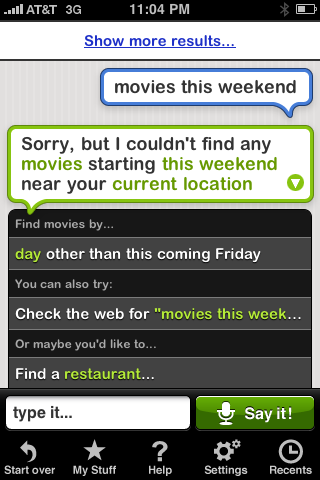

Caption: Rather than guessing when a request lacked necessary information, Siri could ask follow-up questions to help users complete the task.
Third, Siri could hand requests to services better equipped to handle them.
Rather than trying to answer every question itself, Siri could route requests to specialized services. For example, Wolfram Alpha could handle factual or mathematical questions like “What’s a 20% tip on $85?” or “How far is the moon from Earth?” For broader questions outside Siri’s capabilities, it could fall back to Google search, giving users relevant web results instead of an incorrect answer or a dead end.
The important design decision wasn’t simply integrating more services.
It was recognizing that the assistant didn’t have to complete every request internally to provide a useful experience. A user asking an unsupported question could still make progress rather than encounter a conversational dead end.
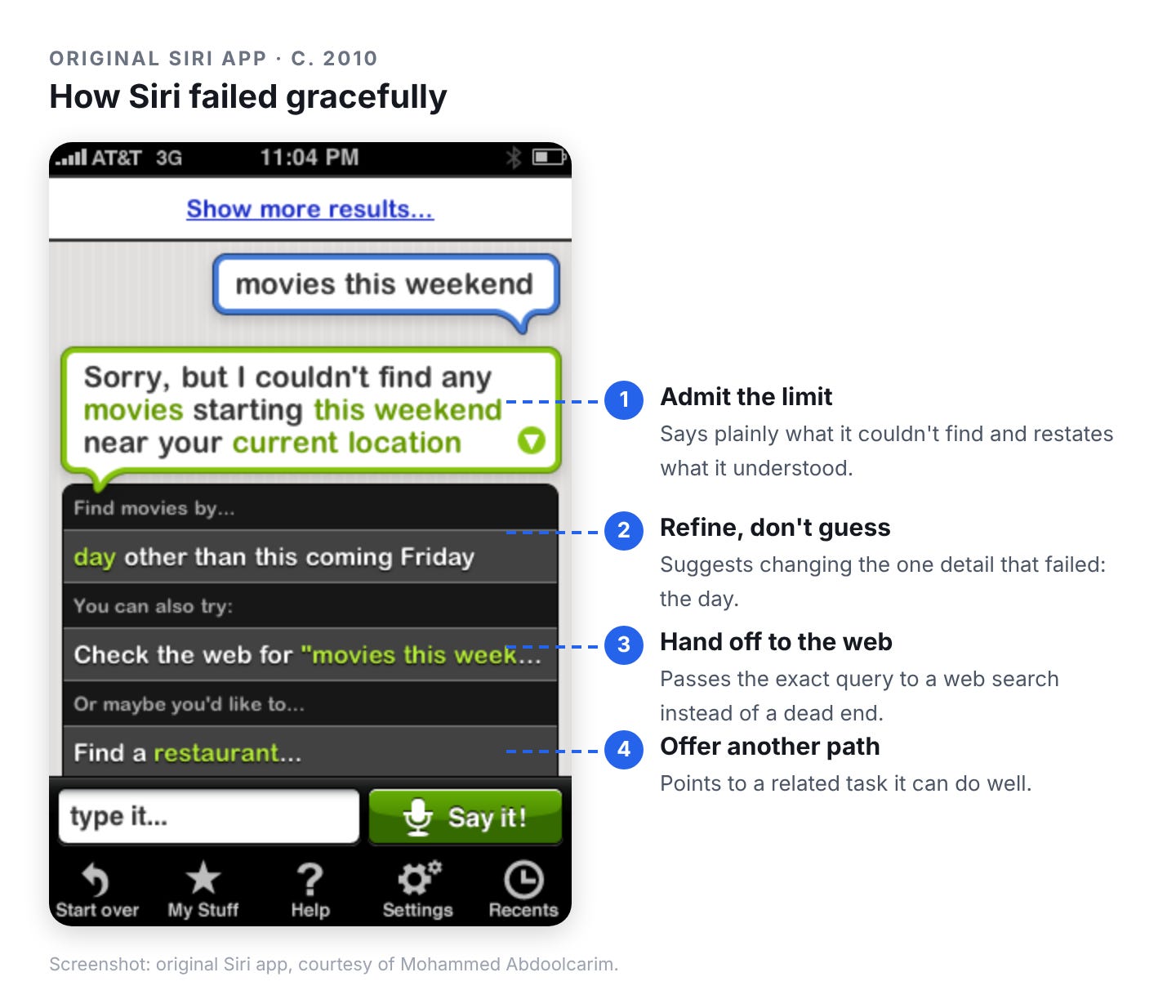
Caption: Siri could route certain requests to external services, preserving a path forward when its own capabilities were insufficient.
Siri’s fallback system was built around three technical layers: intent recognition, dialogue management, and service orchestration. First, Siri converted natural language into a structured intent, extracting parameters such as location, date, cuisine, or party size. Its domain and task models determined whether it had enough information to execute the request. If a required parameter was missing or ambiguous, the dialogue system could ask a targeted follow-up while preserving the original context.
Once the request was sufficiently defined, Siri’s orchestration layer matched it to external services, considering factors such as provider capabilities, response speed, and geographic coverage. If the request couldn’t be fulfilled, Siri could offer an alternative rather than return a dead end. For example, when a movie search produced no local results, Siri suggested changing the date or searching the web.
The key architectural decision was separating understanding the user’s intent from executing the task. This allowed Siri to recover at different stages instead of treating every unsuccessful request as the same failure.
The impact: An imperfect assistant could still deliver a useful interaction
Siri’s approach changed what happened when a request failed. Instead of ending the session, the assistant gave users another path to completing their task.
Take someone asking for “movies this weekend.” If Siri couldn’t find local showtimes, it suggested searching another day, checking Google, or exploring another activity. A failed request no longer had to mean a lost user.
The percentage of failed requests successfully recovered increased from roughly 20% to 30%. Users who recovered also had approximately 30% seven-day retention, compared with 15% for those who encountered a dead end.
The critical distinction was that answer rate and task completion weren’t the same thing. Siri didn’t need to answer every question itself; it needed to help users reach a useful outcome.
For today’s AI agents, this matters even more. An incorrect answer is frustrating, but an incorrect action - updating a CRM, sending an email, or processing a transactioncan have real consequences.
The takeaway: Don’t just measure how often your AI fails. Measure how often it successfully recovers and whether those recovered users come back.
What today’s AI product teams can steal
Experiment: Improve AI task completion by teaching your agent when to ask, act, or escalate.
Imagine an AI sales agent receives the request: “Move the Acme deal forward and let the team know.”
Should it update the CRM stage, create a follow-up task, or send a Slack message? Acting on the wrong assumption could damage user trust.
Siri’s approach suggests a better solution: Design the recovery experience around the level of uncertainty and risk.
Low-risk, clear requests: Execute automatically.
Ambiguous requests: Ask one targeted clarifying question.
High-risk actions: Confirm the intended action before executing.
Unsupported requests: Explain the limitation and offer an alternative or human handoff.
How to test it: Compare your existing agent behavior (control) against confidence-aware clarification and fallback rules (treatment), while maintaining confirmation safeguards for high-risk actions in both groups.
Primary metric: Successful task completion per initiated task.
Secondary metrics: Recovery success rate (percentage of failed interactions eventually completed), abandonment after failure, time to completion, and errors requiring manual correction.
What to watch for: Too many clarifying questions can make your AI slower than the workflow it replaces. The goal is to introduce friction only when the cost of guessing exceeds the cost of asking.
The takeaway: Great AI products aren’t the ones that never fail. They’re the ones that know how to recover without losing the user’s trust.
If you’ve gotten this far, you may be ready to navigate to the 🔥 section and check out our Playbook now.
Case Study #3: Siri’s Biggest Retention Unlock Was Learning When Voice Beat the Touchscreen
Growth lever: Engagement, repeat usage, and habit formation
The problem: Users loved the demo but didn’t need Siri every day
This might be the most counterintuitive lesson from Siri’s early development.
Siri’s biggest competitor wasn’t another AI assistant. It was the touchscreen.
At the time, the iPhone had already changed how people interacted with software. People knew how to open apps, scroll through menus, search for information, and complete tasks with a few taps.
If someone wanted directions, they could open a maps application. If they wanted music, they could navigate to their music library. If they wanted to create a reminder, they could type it into an existing application.
Siri wasn’t competing against an absence of functionality. It was competing against an established behavior that worked.
The early product focused on experiences that demonstrated the power of conversational computing. Users could ask Siri to find movies, locate restaurants, discover events, or arrange a taxi.
These were impressive capabilities, especially for a product launched in 2010. But the usage data revealed an unexpected pattern.
Engagement peaked on weekends and declined during the week. That pattern reflected the use cases Siri had prioritized.
Finding a restaurant, planning an evening out, or discovering weekend activities were valuable activities, but they weren’t necessarily things users did every day.
Siri could make those moments easier. It just couldn’t rely on them to create a daily habit.
The team had built experiences that were easy to demonstrate but less likely to become part of someone’s routine. That led to a different strategic question.
Instead of asking, “What impressive new task can Siri handle?”
The team started asking, “When is talking to your phone easier than touching it?”
The solution: Compete in moments when the existing interface is inconvenient
The team shifted its focus toward contexts where voice had a natural advantage.
Consider someone driving. They need information, but interacting with a touchscreen can be distracting and unsafe. Or consider someone cooking with their hands occupied.
Setting a timer through a series of taps is less convenient than simply asking for one. These situations have something in common: the incumbent interface creates friction.
Voice isn’t necessarily more powerful than touch in those moments. It’s simply better suited to the context.
The team began treating hands-free interactions as a critical opportunity for building repeat behavior. The second shift became especially important after Siri’s integration into iOS.
Rather than relying exclusively on Siri as a separate destination for discovering restaurants and activities, the assistant could make existing device functionality easier to access.
Users could set alarms, create reminders, dictate messages, and perform other simple actions through speech.
These use cases were far less exciting than arranging an evening out through a conversational assistant.
But they had three advantages.
They happened frequently. The user already understood why the task mattered. And the alternative often required more physical interaction.
A user doesn’t need to be convinced that setting an alarm is valuable.
The only thing Siri needs to prove is that saying “Set an alarm for 7 a.m.” is easier than opening the Clock app, navigating to alarms, and configuring one manually.
That is a much simpler value proposition than introducing an entirely new category of behavior.
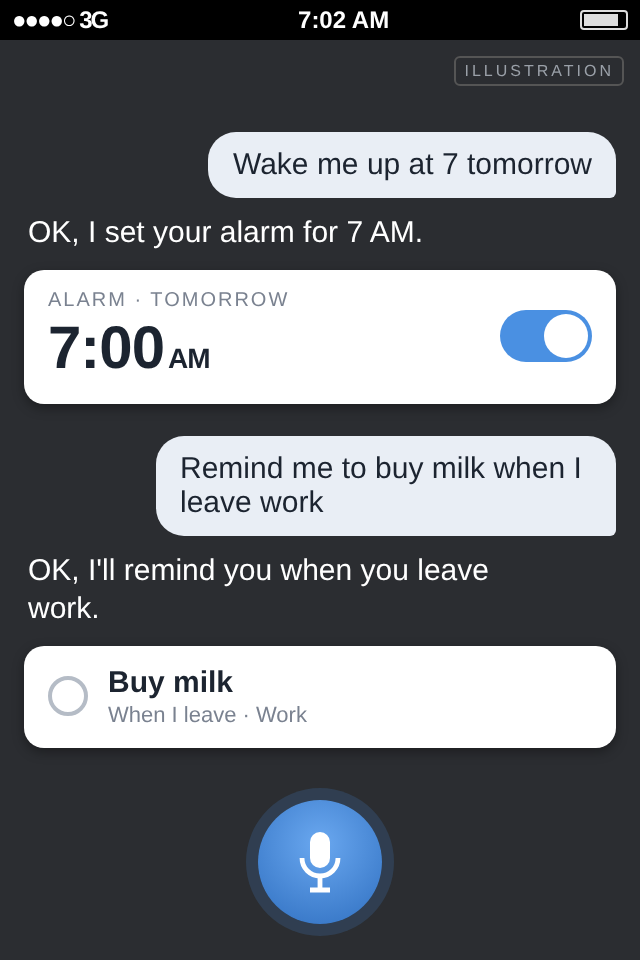
Caption: Following integration into iOS, frequent utility tasks gave Siri a different role: a simpler way to accomplish familiar actions.
The distinction is fundamental. The early product demonstrated what conversational software made possible. The everyday utility experience demonstrated why someone should use it repeatedly.
The impact: Usage shifted from occasional discovery toward daily utility
Before the shift, users averaged roughly 1.2 requests per active user on weekdays versus 2.4 on weekends. As Siri expanded into everyday tasks like alarms, reminders, and hands-free interactions, weekday usage increased to approximately 2.1 requests per active user, narrowing the weekend gap to just 20%.
That represents a 75% increase in weekday engagement, suggesting Siri was evolving from an occasional discovery tool into a more habitual utility.
The most interesting finding wasn’t that Siri gained more capabilities. It was that simple, high-frequency tasks drove more consistent engagement than impressive, occasional ones.
The deeper insight: The real competition is the existing workflow
Most AI teams ask, “What can our agent do?” Siri’s experience suggests a better question: “Is it actually easier than what users already do?”
If a task takes three clicks, opening an AI assistant, writing a prompt, and reviewing its output might introduce more friction. But if it requires switching between five tools and manually gathering information, an agent that completes it in one request creates real value.
This changes how teams should prioritize AI features. Frequency × friction reduction × reliability matters more than the number or sophistication of capabilities. A simple workflow used daily can drive more retention than an impressive feature used once a month.
The goal isn’t to make AI capable of everything. It’s to make it the path of least resistance for something users repeatedly need.
What today’s AI product teams can steal
Experiment: Build a repeatable workflow instead of showcasing every AI capability.
Imagine an AI sales assistant that can research accounts, prepare meetings, draft follow-ups, and update CRM records.
Rather than introducing all these capabilities during onboarding, focus on one recurring pain point: meeting preparation.
Before each call, sales reps manually search their CRM, review emails, and gather account information. Instead, the AI could connect to their calendar and CRM, automatically identify an upcoming meeting, and generate a useful account brief.
How to test it: A/B test broad, feature-focused onboarding (control) against onboarding that guides users through this single recurring workflow (treatment).
Primary metric: Repeat workflow adoption—the percentage of activated users successfully completing the workflow on at least three distinct days within 14 days.
Secondary metrics: Usage per eligible meeting, time saved versus manual preparation, and D30 retention. Validate that users actually use the briefs, not just generate them.
What to watch for: A workflow isn’t better simply because AI completes it. If generating and reviewing an AI brief takes four minutes but the manual process takes two, you haven’t removed friction. And if usage only happens after reminders, you may not have created a genuine habit.
The takeaway: Don’t build AI around what’s technically impressive. Find a frequent, painful workflow where AI is reliably the easiest way to get the job done.
AI Growth Is About Closing Three Gaps
Looking across these three stories, there’s a consistent pattern. Siri’s early growth challenges weren’t only about improving the underlying technology.
They were about connecting the product’s capabilities to user behavior.
The first challenge was the discovery gap.
Siri could complete useful tasks, but users didn’t necessarily know what to ask. Contextual onboarding helped steer people toward requests that produced a successful first experience.
The second was the trust gap.
Siri couldn’t reliably fulfill every request. Graceful degradation helped users make progress through clarification, honest limitations, and external services rather than forcing an answer.
The third was the habit gap.
Siri could handle impressive tasks, but many were occasional. Repeat usage became more compelling when voice offered a simpler path through frequent, familiar workflows.
These challenges reinforce one another.
If people can’t discover a valuable use case, they won’t activate.
If early interactions damage their trust, they won’t return.
And if the product doesn’t offer a meaningful advantage over their existing workflow, it won’t become a habit.
It’s tempting to assume that a more capable model will solve all three problems.
Better models can expand the range of tasks an assistant completes successfully. But product teams still need to decide which tasks to surface first, how the assistant should behave under uncertainty, and where it can deliver a meaningful improvement over existing behavior.
That’s why the next generation of successful AI products may not be the ones that showcase the most impressive capabilities.
They may be the ones that most effectively turn those capabilities into repeatable user value.
The fundamental growth question isn’t “How much can our AI do?”
It’s “What can users successfully discover, confidently delegate, and find worth doing again?”
And that’s a question Siri’s team was already confronting more than a decade ago.
🔥 The IGG Playbook: How to Find Your AI Product’s Biggest Growth Bottleneck
Siri’s experience reveals a critical lesson for AI founders: More capabilities won’t fix a broken activation or retention loop.
Before building another feature or upgrading your model, figure out where users are getting stuck. Are they failing to discover valuable use cases? Losing trust after unsuccessful interactions? Or simply not finding a compelling reason to return?
Here’s how we’d diagnose and tackle these problems over the next 30 days.
Step 1: Find where users are losing value
Start by analyzing the first 100–200 sessions of recently acquired users. Don’t just measure prompts submitted or messages exchanged. Reconstruct whether each user actually accomplished something valuable.
Instrument four events across the user journey:
First-request success rate: What percentage of users submit a request the AI can successfully fulfill?
First-task completion rate: What percentage actually finish a meaningful task?
Failure recovery rate: When the AI fails or misunderstands, what percentage of users ultimately complete their task?
Repeat workflow adoption: What percentage return to successfully complete the same valuable workflow multiple times?
Segment these metrics by use case, acquisition channel, and whether the user is new or returning.
Here’s where it gets interesting: a product might have a 70% first-request success rate but only 25% first-task completion. That suggests the problem isn’t necessarily understanding the request—it’s delivering a useful outcome.
Alternatively, users might successfully complete their first task but never come back. That’s likely a different problem: the AI hasn’t become a better alternative to their existing workflow.
Don’t optimize the entire funnel at once. Identify the largest gap between attempted tasks and realized value.
Step 2: Run the experiment that matches your bottleneck
If activation is broken, test contextual onboarding.
Replace generic suggestions like “Ask me anything” with prompts based on what users have connected, uploaded, or recently attempted.
For example, an AI analytics assistant that detects a newly connected revenue database could suggest “Find the biggest revenue decline this month” rather than “Analyze my data.”
A/B test generic versus contextual suggestions. Measure successful first-task completion within 24 hours, not merely whether users submit more prompts. Monitor unsupported requests and D7 retention to ensure you’re creating real value.
If trust is broken, test intelligent recovery.
Review failed sessions and categorize them into ambiguous requests, unsupported capabilities, and execution failures.
Build a recovery policy: clarify ambiguous requests, offer alternatives for unsupported tasks, and require confirmation before consequential actions.
Compare this against your existing experience, preserving necessary safety safeguards in both groups.
Your primary metric is recovery success rate: Of all sessions that initially failed, how many eventually reached the intended outcome?
Also measure abandonment, unnecessary clarifications, and time to completion. You want fewer dead ends, not an assistant that interrogates users before every action.
If retention is broken, focus on one frequent workflow.
Analyze your retained users. Which tasks do they complete repeatedly, and what manual process did those tasks replace?
Prioritize opportunities using three dimensions: frequency of the underlying task, friction eliminated by AI, and reliability of the outcome.
For example, instead of showcasing ten capabilities in an AI sales assistant, guide users through one recurring task: preparing for customer meetings using connected calendar and CRM data.
Test broad feature onboarding against this focused workflow.
Measure the percentage of eligible users who successfully repeat the workflow on at least three distinct days within 14 days, alongside usage per eligible meeting and time saved versus the existing process.
The key question: Are users coming back because the AI is genuinely the easiest way to accomplish something—or because they’re still experimenting with it?
Step 3: Measure outcomes
One mistake we’d avoid is treating increased AI usage as proof of product value.
More prompts could mean users are engaged. They could also mean users are repeatedly correcting bad responses.
Longer conversations could indicate productive collaboration—or that the assistant requires too many steps to complete something simple.
That’s why every experiment needs an outcome metric and a friction guardrail.
For onboarding, pair first-task completion with time to first value.
For failure recovery, pair eventual task completion with the number of clarifying turns and incorrect actions.
For habit formation, pair repeat usage with time saved and evidence that users actually consume or act on the AI’s output.
Where possible, compare the AI workflow against the incumbent experience, not just against another version of the AI.
If users can complete a task in two minutes manually but need four minutes to generate and verify an AI response, more AI engagement isn’t necessarily a win.
Step 4: Build a 30-day experimentation roadmap
Week 1 — Diagnose: Instrument the four core metrics, review 100–200 sessions, and identify the largest source of lost user value.
Week 2 — Build: Choose one experiment, define eligibility, establish the control and treatment, and validate that the suggested workflows or recovery paths actually work.
Week 3 — Launch: Randomize users into control and treatment groups. Monitor task completion and guardrails, especially incorrect actions and user abandonment.
Week 4 — Evaluate early signals: Review first-task success, recovery, and friction metrics. Continue following cohorts until the full D7, D14, or D30 retention windows have matured before declaring a retention win.
Use the findings to decide whether to ship, iterate, or investigate a different bottleneck.
You don’t need to run every experiment. The objective is to identify the one intervention most likely to convert existing AI capabilities into meaningful, repeatable user value.
Want help applying this to your product?
Let’s talk