

👋 Hi, it’s Kunal, and welcome to the Insider Growth Group newsletter, our bi-weekly deep dive into the hidden playbooks behind tech’s fastest-growing companies.
Our mission is simple: We help you create a roadmap that boosts your key metrics, whether you're launching a product from scratch or scaling an existing one.
What We Stand For
Actionable Insights: Our content is a no-fluff, practical blueprint you can implement today, featuring real-world examples of what works—and what doesn’t.
Vetted Expertise: We rely on insights from seasoned professionals who truly understand what it takes to scale a business.
Community Learning: Join our network of builders, sharers, and doers to exchange experiences, compare growth tactics, and level up together.
Every Pricing Conversation in 2026 Sounds the Same
Every pricing conversation in 2026 seems to start in the same place: seats, credits, usage, or outcomes. Pick the metric that best maps to value, migrate customers toward it, and build the business around it.
You can see why. Salesforce now sells Agentforce through multiple pricing logics, including credits tied to actions, conversation-based pricing for some customer-facing agents, and user-based licenses for employee use cases. Stripe’s 2026 guidance lays out several different AI pricing models and makes a more revealing point: the market has not settled on a single winner.
HubSpot’s own AI pricing already reflects that same ambiguity. Its Customer Agent consumes credits when it resolves a conversation. Its Prospecting Agent consumes credits when it recommends outreach. Its Data Agent consumes credits when it performs work on a record. These are all different forms of value, bundled into a shared commercial currency.
The industry is experimenting with almost every answer at once, but most of the discussion still treats pricing as if it were a one-time model-selection exercise. Choose the right primitive, migrate customers toward it, and move on.
HubSpot had the harder version of this problem years before the rest of SaaS and AI native companies started debating it in public. One product became several. Several products became multiple editions, personas, seat types, usage limits, add-ons, and eventually AI credits. Each product team had growth targets. Each packaging decision made sense locally. Together, those choices created a pricing system that became increasingly difficult for customers and even employees to reason about.
The team working through it did not discover that seats were better than credits, or that credits were better than outcomes. The more useful lesson was underneath all three: a pricing architecture only feels simple if the customer can understand what to buy and a finance team can reasonably predict what it will cost.
And this is no longer just an interesting pricing experiment. What started as a limited release is becoming HubSpot’s broader pricing architecture. According to David, the early results have been strong enough that the model is now being expanded much more broadly.
That is what makes this worth studying now. HubSpot has already spent years working through a pricing problem most SaaS and AI companies are only beginning to encounter.
Sponsored by CEOfriend.ai
HubSpot fixed its pricing by sending every change through a memo and a review board. Most founders have no board, just one desk and a few people who each see one slice. CEOfriend gives you AI advisors across finance, marketing, strategy, and growth to pressure-test the decision before you ship it. First month is free with code IGTRIAL at ceofriend.ai.
Introducing David Barron

David Barron is the founder of Orange Line, where he helps product and revenue teams work through pricing, packaging, product launches, and go-to-market strategy.
He spent more than eleven years at HubSpot across sales, product, operations, and leading pricing and packaging. Including being part of the early teams behind HubSpot CRM, Service Hub, and Operations Hub.
His experience also includes working on PLG at Rippling, bringing a perspective that spans self-serve adoption, sales, and multi-product expansion.
Connect with him on LinkedIn if you’d like to chat about pricing, product-led growth, or GTM strategy.
The Simplification Trap
If you open HubSpot’s new pricing architecture and count the mechanics you will not come away thinking the company has embraced radical simplicity. There are three editions, two seat types, credits, volume tiers, capacity packs, add-ons, and different credit rates for different kinds of activity.
By the usual definition of simple pricing, that sounds like a lot.
But compare it with the system HubSpot was trying to unwind: multiple product Hubs, multiple editions within those Hubs, different seat types, usage-based SKUs, dozens of add-ons, and customers holding different combinations of all of them at once. A business could be on one tier of Marketing Hub, another tier of Sales Hub, another version of Service Hub, and still need to work out which users required which paid seats and what an additional capability would unlock.
The distinction matters. Pricing simplicity is not the number of mechanics inside your billing system. It is the number of decisions you force the customer to understand.
Most customers are trying to answer three questions:
What do I need?
What do I get?
What am I likely to pay?
If those answers are clear, a pricing system can have several components and still feel easy to buy. If those answers are fuzzy, even a one-metric model can feel impossible.
That is the lens I would use to understand HubSpot’s new pricing architecture. But first, it helps to understand how the old system got so complicated in the first place.
The Problem: HubSpot’s Pricing Started Reflecting Its Org Chart
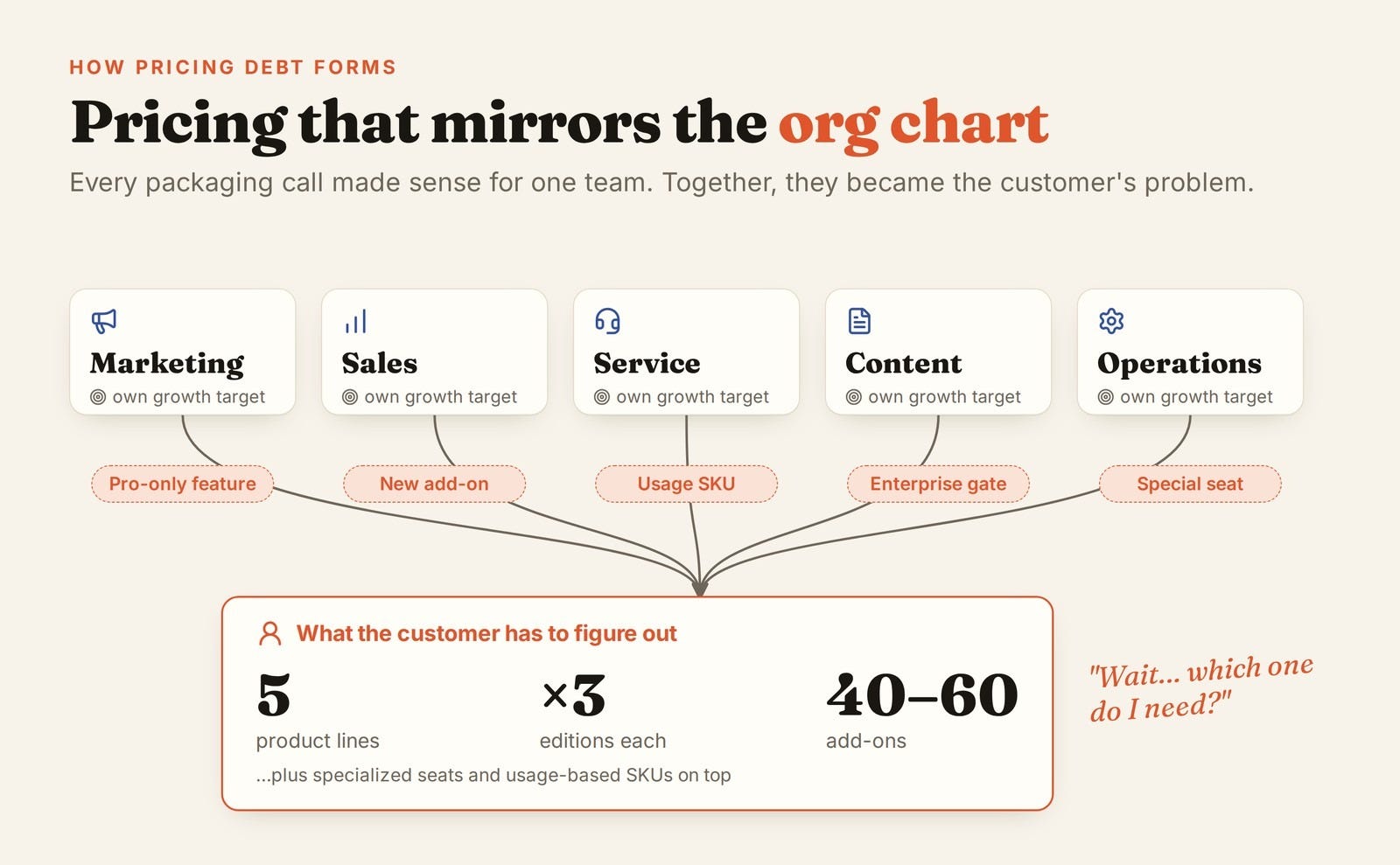
Pricing debt rarely begins with one obviously bad decision. It accumulates through a series of reasonable ones.
A company launches one product, then another. It introduces Starter, Professional, and Enterprise because different customers need different levels of capability. A product team spends a huge share of its R&D capacity building a new feature and wants to place it in Professional or Enterprise because the team has a revenue target to hit. Growth wants the same feature in Freemium or Starter because it could improve acquisition. A horizontal platform team believes the capability should be available everywhere because it is foundational.
At HubSpot, those local decisions compounded over time. David, a former HubSpot product leader who spent 12 years at the company, described a business with five major product lines serving different personas, multiple editions across those products, specialized seats, usage-based SKUs, and roughly 40 to 60 add-ons at different points in the company’s evolution.
Some of those add-ons generated real money. Others contributed relatively little and still had to be supported forever. Every add-on required entitlement logic, billing rules, documentation, sales enablement, support, and eventually migration work when the architecture changed again.
Underneath all of that was an incentive problem. Product teams were responsible for growing their own businesses. If a team had spent a year building a valuable capability, the rational move was to put it somewhere that could monetize. But if every product team optimized packaging locally, the platform became harder to understand globally.
That is how pricing debt forms: not through bad strategy, but through local optimization.
The ticket-routing problem
One example from David captures the issue better than any pricing matrix.
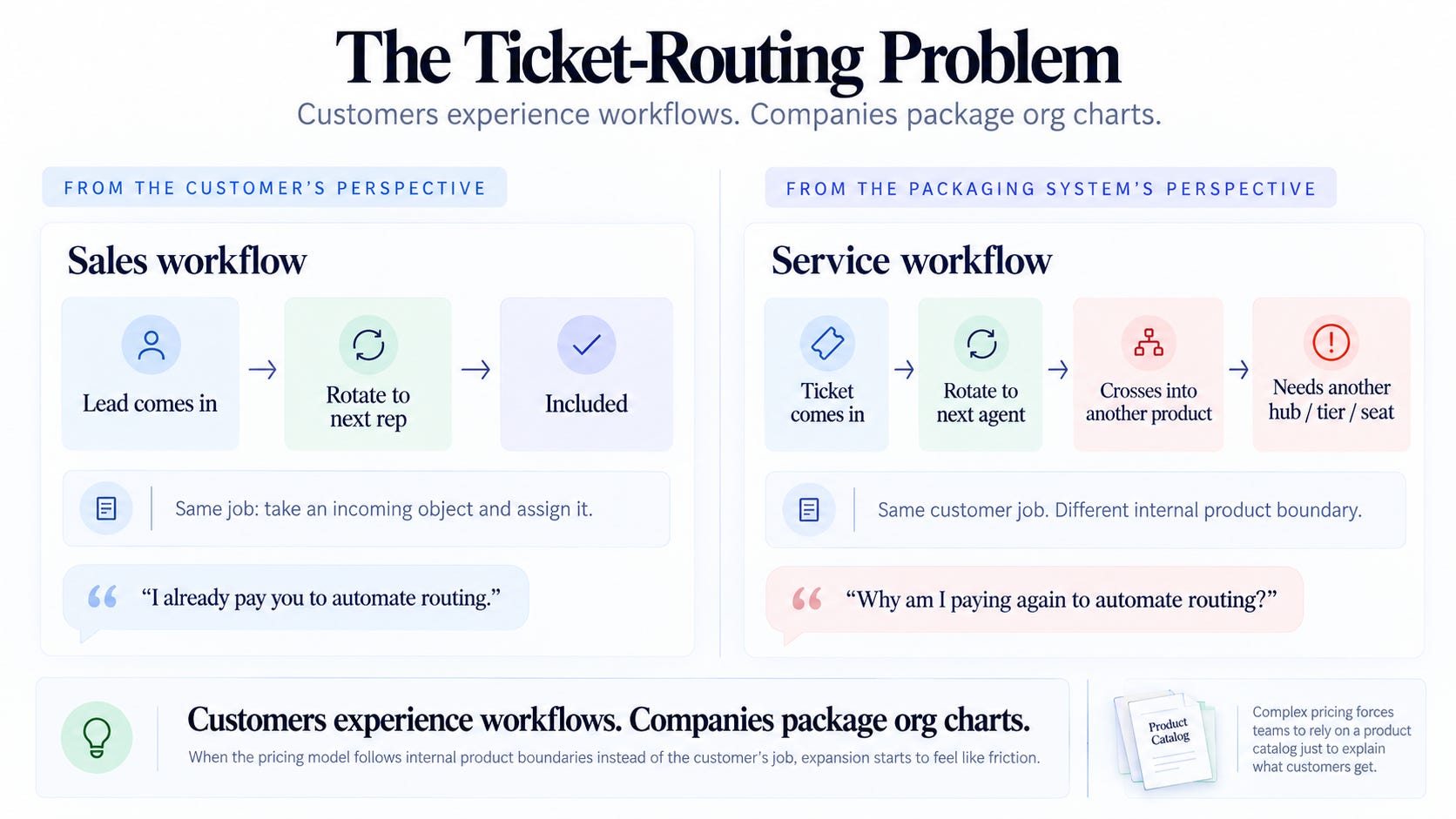
A HubSpot customer using the sales product could create an automation that rotated incoming leads across a team. A lead comes in, and the workflow assigns it to the next rep.
Now imagine the same company starts using HubSpot for customer service. It wants to do essentially the same thing with a support ticket: a ticket comes in, and the system routes it to the right person.
From the customer’s perspective, this is almost exactly the same job. Take an incoming object and assign it.
From the packaging system’s perspective, the customer has crossed into another product. That can mean a different Hub, a different edition, and another seat entitlement.
The customer is thinking: I already pay you to automate routing. Why am I paying again to automate routing?
HubSpot is thinking: Sales automation and service automation belong to different products.
That gap is the problem.
Customers experience workflows. Companies package org charts.
The complexity also spread to the go-to-market team. A customer might have Marketing Hub Enterprise, Sales Hub Starter, Service Hub Professional, and another product on a different tier. When they asked what an upgrade actually unlocked across the platform, the answer was difficult to reconstruct.
The most frequently visited internal resources was HubSpot’s own Product & Services Catalog. That is a useful diagnostic. If your own employees need a reference manual to explain what a customer gets, you no longer have a pricing-page problem. You have a pricing architecture problem.
Before HubSpot Could Fix Pricing, It Had to Fix the Pricing Factory
The obvious response would have been to redesign the pricing page. That would have solved almost nothing.
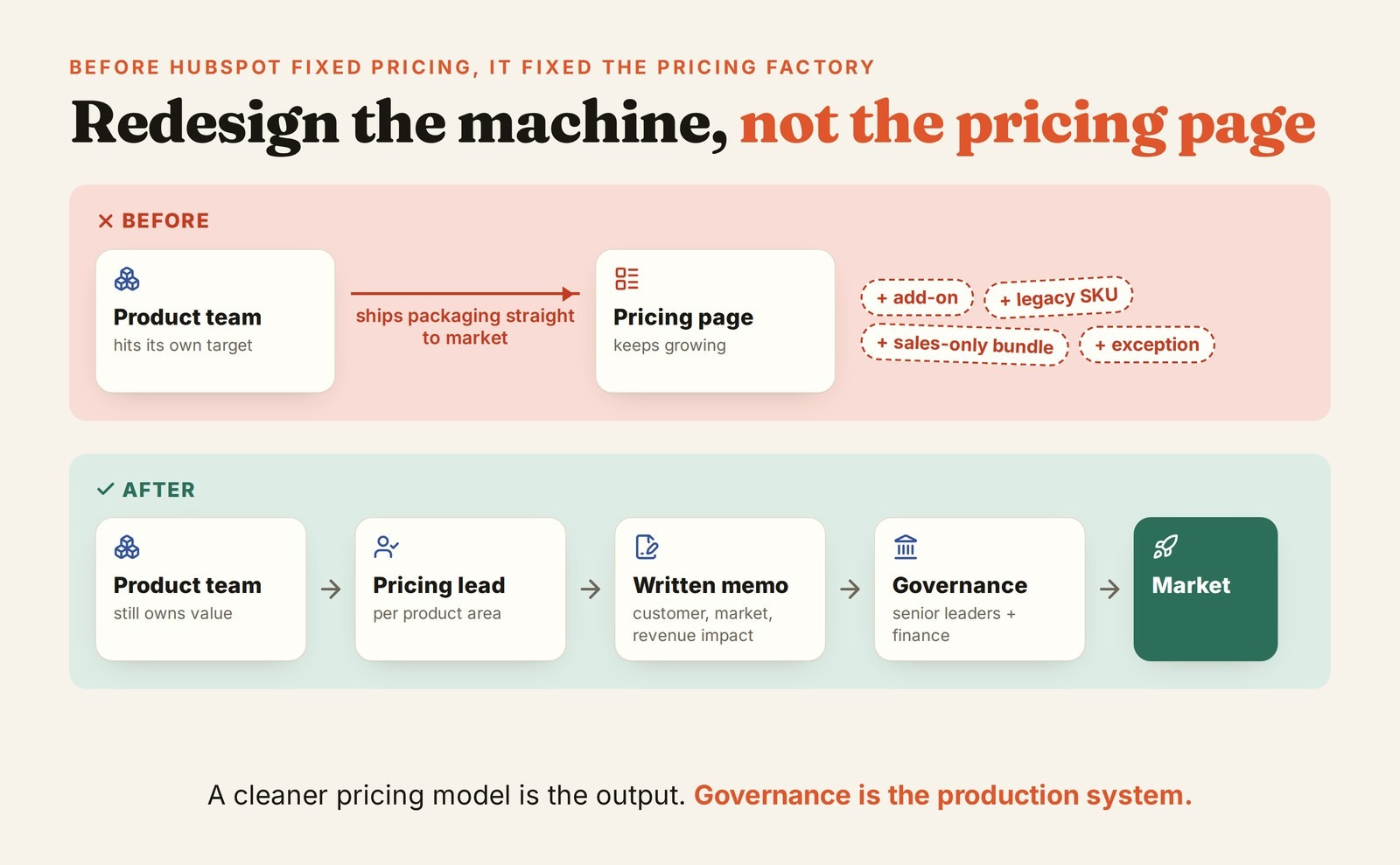
The same system that created the complexity was still running underneath it. A product team could ship something new, make a packaging recommendation, coordinate with product marketing, legal, sales enablement, growth, and the web team, and get the change into the market. Over time, that meant the company kept accumulating local pricing decisions faster than anyone could simplify them.
So HubSpot put a process around those decisions.
David described pricing leads assigned to different product areas. Meaningful pricing or packaging changes required a memo. That memo had to spell out the customer, market, revenue impact, and cross-functional consequences. Larger changes moved through a pricing governance process involving senior stakeholders. As usage-based billing became more important, finance and accounting had to weigh in as well because packaging decisions could affect how revenue was recognized.
The important part is that product teams did not stop owning value. They still had growth targets and still made the case for where new capabilities should live. What changed was their ability to create pricing complexity unilaterally in order to hit those targets.
That is the part most pricing redesigns skip. Teams change the output without changing the machine producing the output. Twelve months later, the clean new model has eight exceptions, three legacy SKUs, two sales-only bundles, and a PM asking for one more add-on because “this customer is different.”
You cannot simplify pricing while leaving the system that creates pricing complexity untouched.
A cleaner pricing model is the output. Governance is the production system.
HubSpot’s New Pricing Teardown
It started as a small pilot in one market in EMEA, and it performed well that HubSpot is now expanding from there.
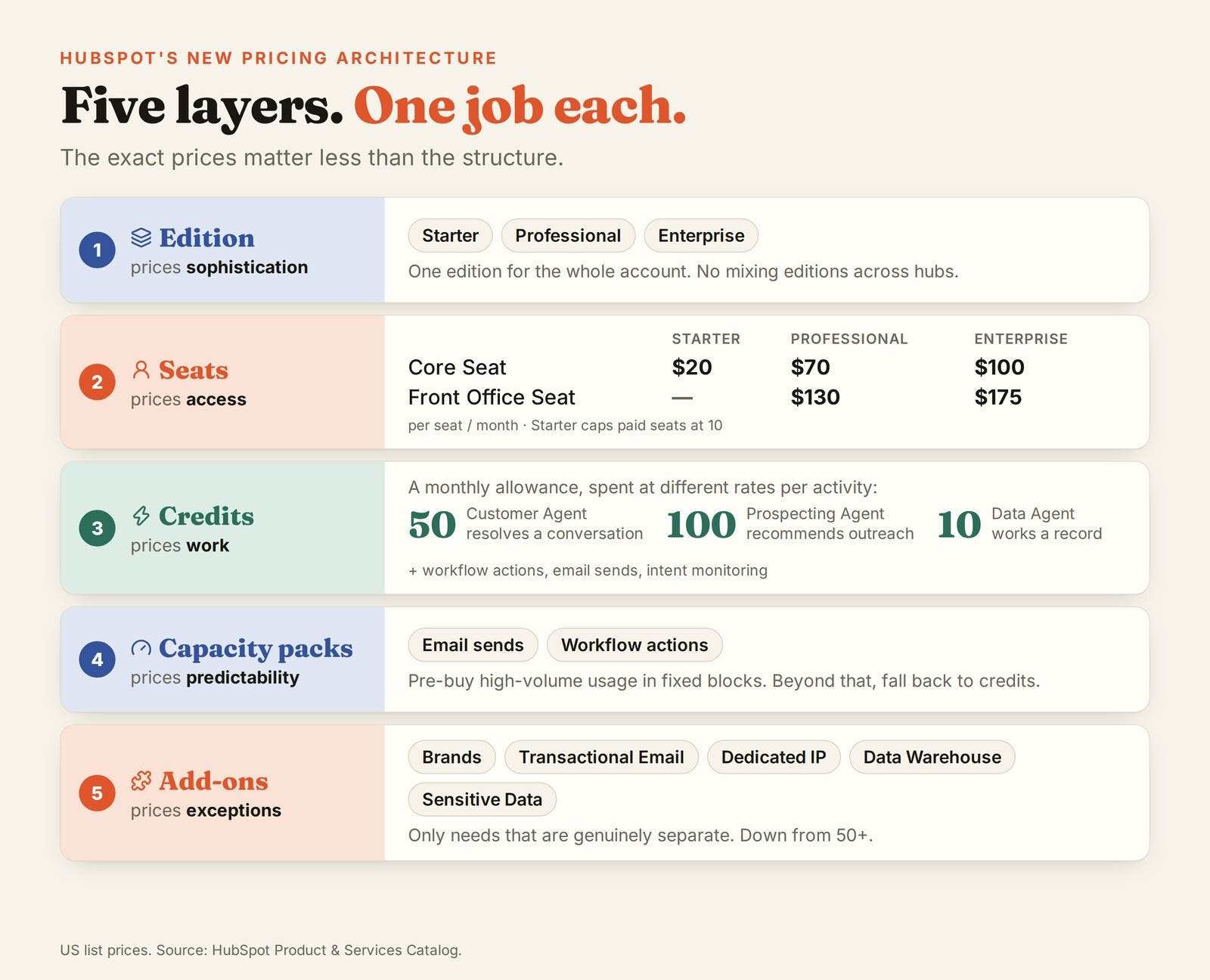
What began as a limited release has evolved into a broader pricing architecture built around editions, seats, credits, capacity packs, and a much narrower set of add-ons.
The exact prices matter less than the structure. HubSpot did not replace one pricing model with another. It built a layered system where each pricing mechanic solves a different problem.
Below are the six moves HubSpot made and the principles other SaaS and AI companies can apply before their own pricing gets this complicated.
Move 1: Collapse the Product Matrix
The new pricing model still has Starter, Professional, and Enterprise. What changes is the product architecture underneath those tiers.
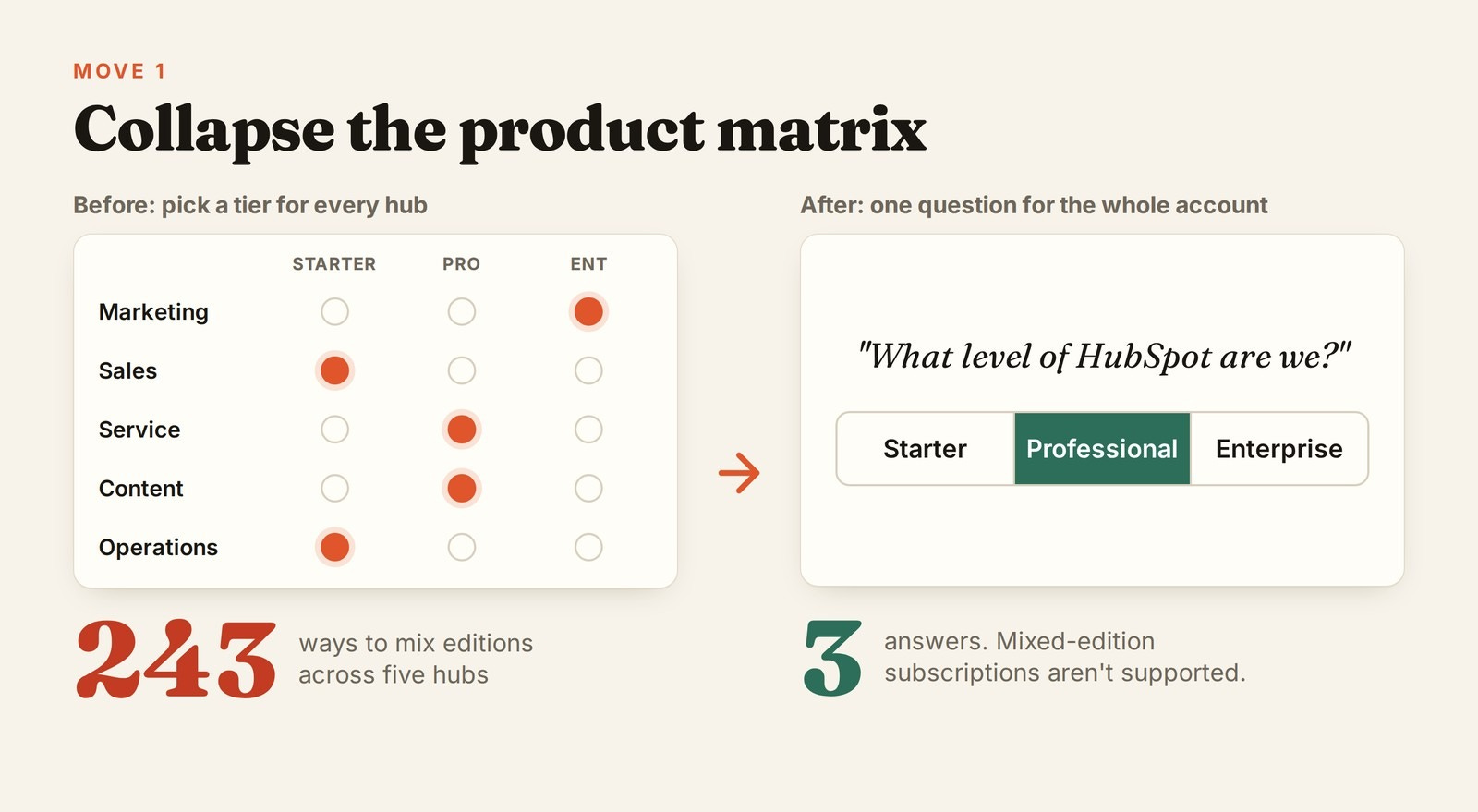
Instead of asking a customer to assemble different editions of different Hubs, HubSpot is moving toward selling the customer platform at one edition. Mixed-edition subscriptions are not supported.
That removes an enormous amount of combinatorial complexity. Under the old structure, a buyer might have to decide which tier of Marketing Hub they needed, which tier of Sales Hub, which tier of Service Hub, which add-ons belonged on top, and which users required which type of seat.
The new question is much closer to: What level of HubSpot are we? Starter, Professional, or Enterprise.
That is a more opinionated model. A customer might want one Enterprise capability while otherwise fitting comfortably into Professional. But HubSpot is making a deliberate trade: fewer bespoke combinations in exchange for a buying decision that is easier to understand.
How HubSpot applied it
HubSpot effectively moved the primary packaging decision up a level. Instead of making customers choose the right tier independently across several products, it made the edition an account-level choice.
That matters because most of the complexity was coming from combinations. Marketing Pro + Sales Starter + Service Enterprise may be technically flexible, but flexibility quickly becomes decision debt when customers have to understand every permutation.
By collapsing those choices, HubSpot reduced the number of branches in the buying journey without necessarily reducing the number of capabilities in the product.
The broader lesson is simple: if customers repeatedly buy the same modules at roughly the same level, you may not have several pricing decisions. You may have one pricing decision disguised as several.
Move 2: Reduce Seat Types to Two Useful Distinctions
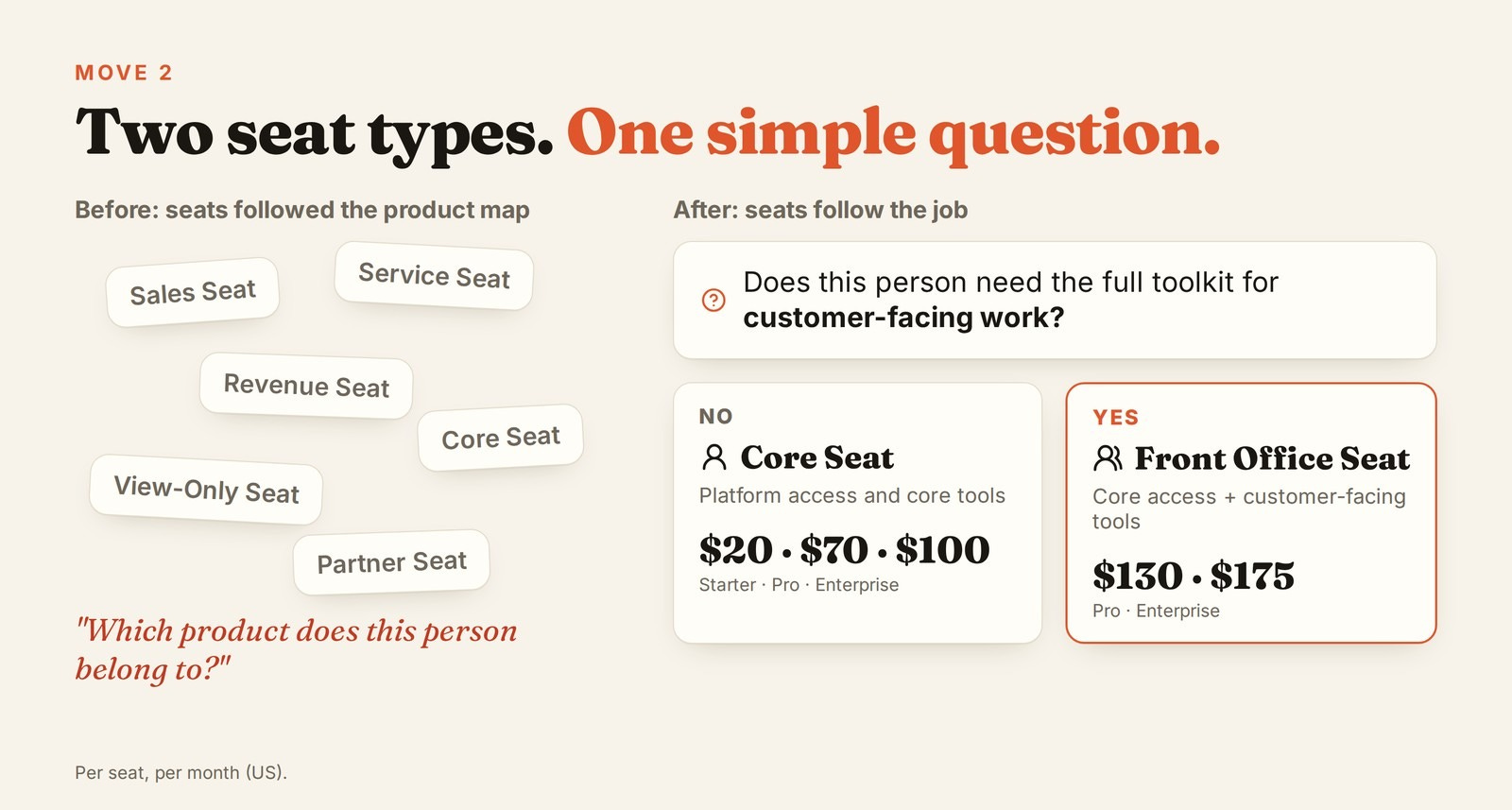
The new pricing model has two seat concepts: Core Seats and Front Office Seats.
Core Seats give a user access to the platform and its core functionality. Front Office Seats include Core access plus the dedicated tools used by customer-facing teams.
The current pricing looks like this:
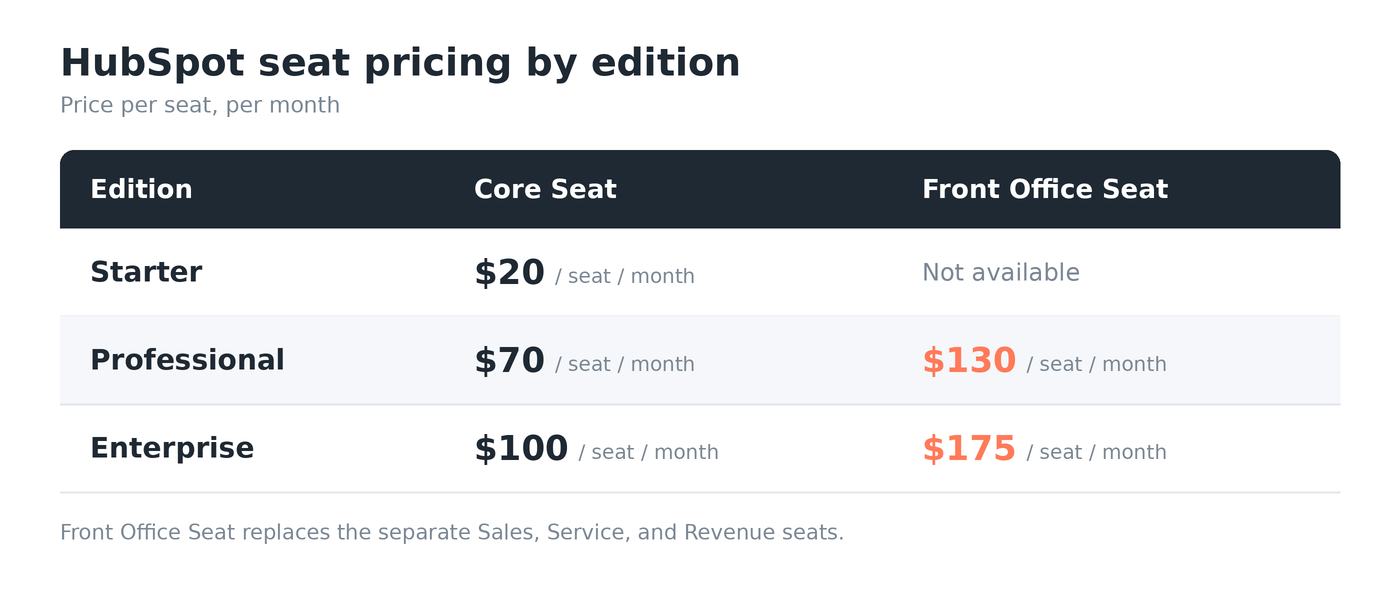
Starter also caps paid seats at 10.
The important part is not the exact price difference. It is the distinction HubSpot chose to preserve.
Under the older model, a customer could encounter different seat types tied to different products and functions. That creates a familiar SaaS problem: the buyer has to understand your product architecture before they can decide what kind of user someone is.
HubSpot is moving toward a much simpler question: Does this person need access to the platform, or do they need the full set of tools for customer-facing work?
That is a distinction customers can actually reason about.
How HubSpot applied it
HubSpot collapsed several product-specific seat decisions into two broader user types.
Instead of asking whether someone is primarily a Sales user, Service user, Revenue user, or some combination of the three, the pricing model asks what level of access that person needs.
That shifts the packaging logic away from which internal product does this employee belong to? and toward what job does this employee actually need to perform?
It also reduces a subtle form of pricing friction: the same employee can move across workflows without forcing the customer to constantly reconsider which product-specific entitlement they need.
The broader lesson is that seat types should represent meaningfully different levels of access or jobs to be done, not every boundary in your product portfolio.
If two seat types are routinely bought by the same person to complete the same workflow, you probably do not have two user types. You have one user type split across two SKUs.
Move 3: Separate Human Access From Work Performed
This is the part I think most AI companies should pay attention to.
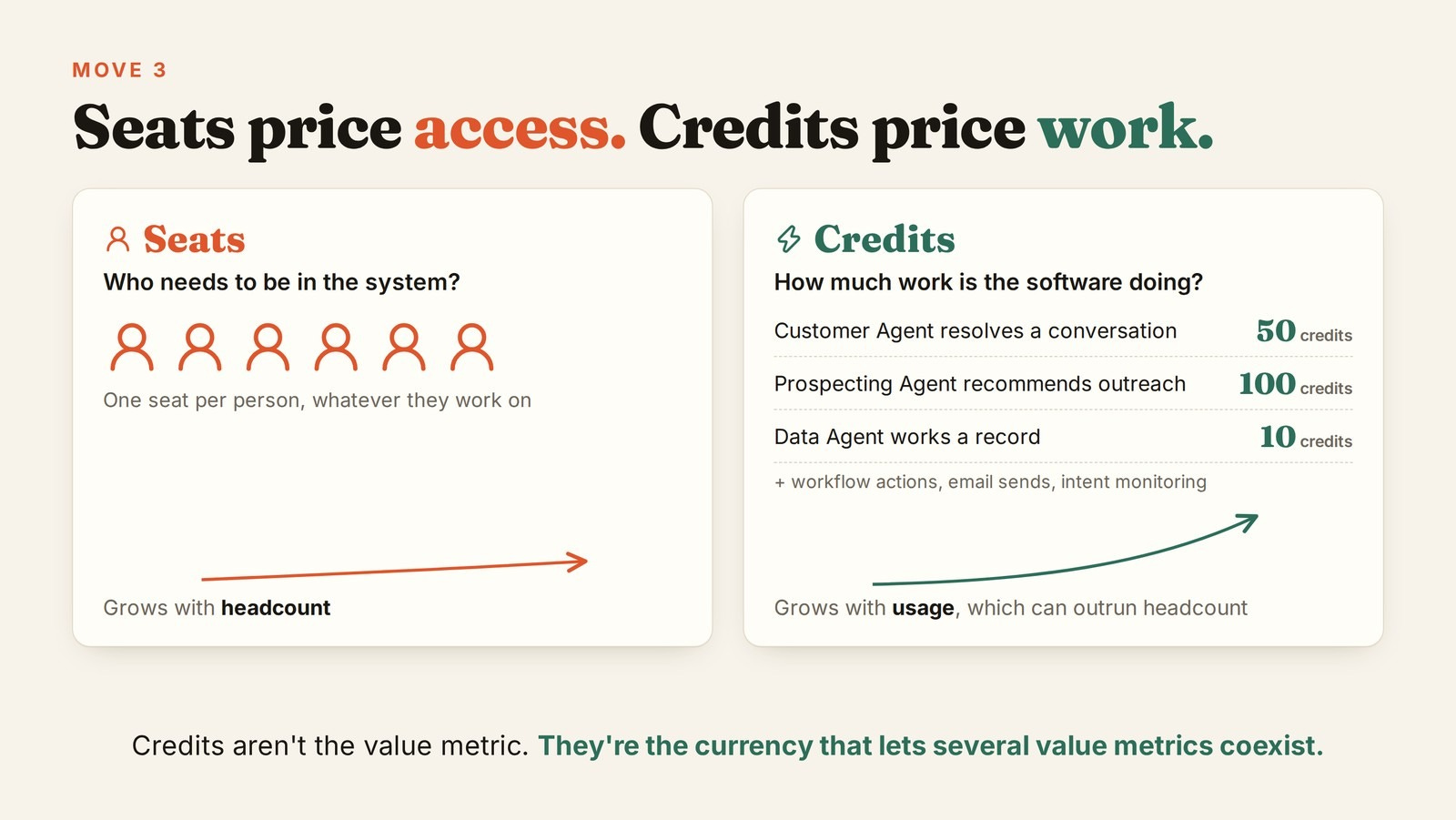
HubSpot is using seats and credits for different jobs. Seats price access. Credits price work.
The new pricing model includes a monthly credit allowance.
Those credits can be consumed across very different types of activity. A Customer Agent resolving a text conversation consumes 50 credits. A Prospecting Agent recommending outreach for a lead consumes 100. A Data Agent generating a response for a record consumes 10. Workflow actions consume credits. Marketing email sends consume credits. Intent monitoring and certain Data Studio activities consume credits too.
At first glance, that seems strange. A support resolution, a workflow action, and an email send are obviously not the same thing.
That is exactly why the credit exists.
The credit is not the underlying value metric. It is the translation layer between several value metrics.
Credits are not the value metric. They are the currency that lets several value metrics coexist.
This is a much more useful way to think about AI pricing than “seat pricing is dead.” If the AI is helping a person do their job, a seat can still make sense. If the software is doing incremental work on behalf of the customer, usage can make sense. If different types of work have different economics, credits can translate those workloads into one commercial language.
You do not need one pricing primitive to carry the entire product.
How HubSpot applied it
HubSpot separated two things that used to get bundled together: who needs access to the product and how much work the product is doing for them.
Seats handle the first. Credits handle the second.
That means a company can add another employee without pretending that employee will generate the same amount of usage as everyone else. And as AI agents, automations, and messaging do more work in the background, HubSpot can monetize that additional value without inventing another seat type or product tier.
The broader lesson is simple: if usage can grow much faster than headcount, seats probably cannot be your only pricing metric.
Move 4: Smooth the Upgrade Cliff Without Inventing Another Tier
One of HubSpot’s older problems was the jump from Starter to Professional.
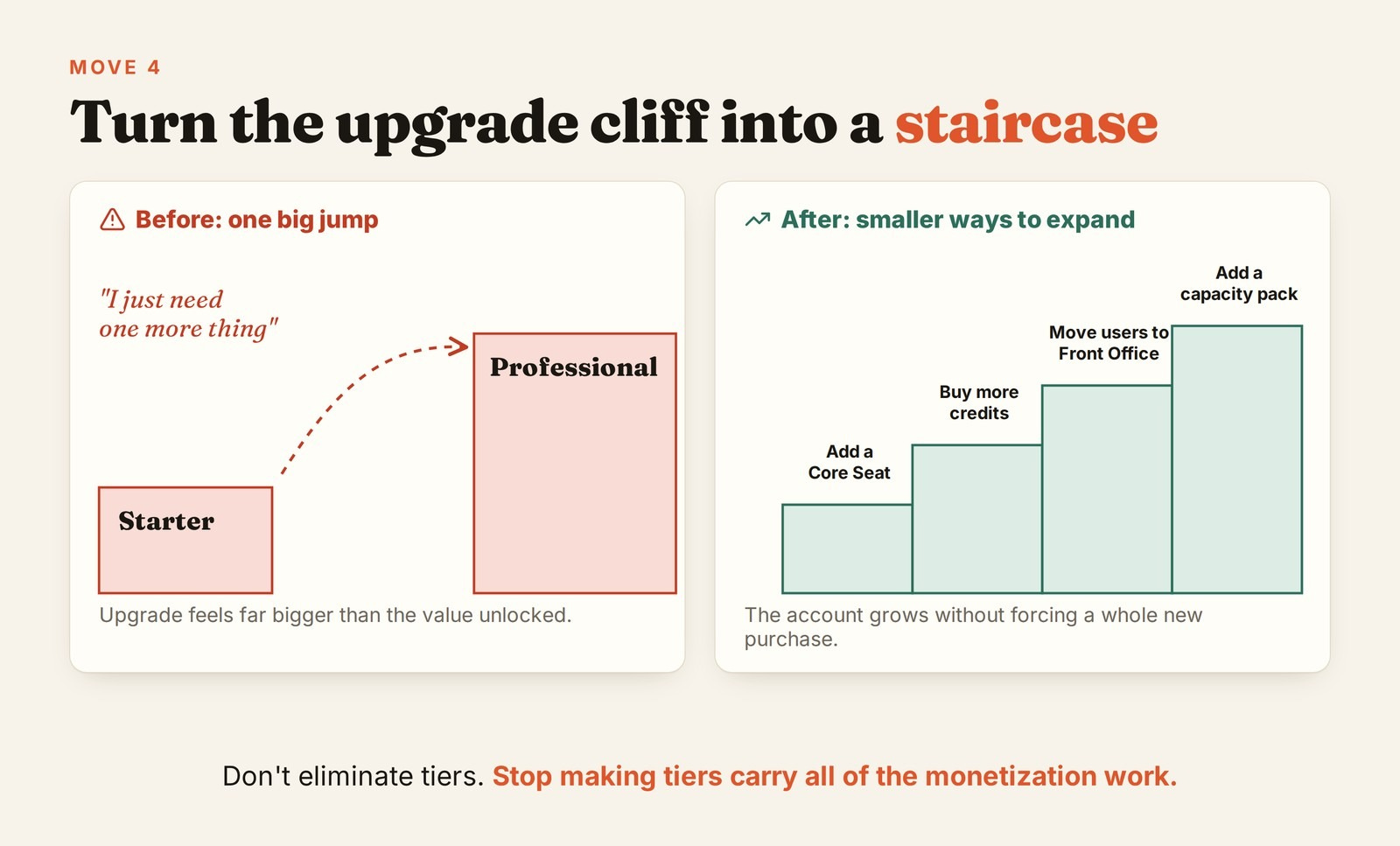
It’s a classic pricing chasm. A customer could enter cheaply, then reach a point where one important capability required a Professional upgrade that felt dramatically larger than the incremental value they were trying to unlock.
There are four obvious ways to solve that. You can add another tier, lower Professional pricing, raise Starter pricing, or simply live with the cliff.
Each option creates another problem. A new tier adds SKU complexity. Lowering Professional can destroy revenue. Raising Starter can hurt acquisition. Keeping the cliff can suppress expansion.
The more interesting answer is to let customers expand commercially in smaller increments inside the architecture. Add another Core Seat. Move some users to Front Office. Buy more credits. Buy predictable capacity.
The account can grow without every incremental need forcing a brand-new product purchase.
That is a meaningful design shift. The goal is not to eliminate tiers. It is to stop making tiers carry all of the monetization work.
How HubSpot applied it
Instead of creating another package between Starter and Professional, HubSpot added more ways for customers to expand within the existing structure.
A company can grow by adding seats, moving certain users to Front Office, consuming more credits, or purchasing additional capacity. That creates smaller monetization steps before the customer has to make a much larger edition jump.
The broader lesson is that when customers hit a pricing cliff, the answer does not always have to be another tier. Sometimes you need more ways to expand between tiers.
Move 5: Put Complexity Back When It Makes the Bill Easier to Defend
During the redesign work, the team explored pushing more activity - including email and automation into a credit model. On paper, that is cleaner. One usage currency. One meter. One billing system.
Then they put it in front of customers and partners.
The reaction was essentially: How am I supposed to budget this?
That concern becomes obvious the moment you imagine taking the proposal to a CFO. How many marketing emails will we send next quarter? How many workflow actions will fire? How many automations will run? How many AI tasks will our teams create once they realize what the product can do?
A buyer can understand the pricing perfectly and still reject it because they cannot forecast the invoice.
So HubSpot added some complexity back.
The new pricing architecture includes fixed capacity packs for high-volume work. Professional and Enterprise customers can buy monthly email-send capacity in blocks. They can also buy workflow-action capacity. Usage beyond those levels can fall back to credits.
That means HubSpot added another pricing mechanic in order to make the product easier to buy.
Predictability is a form of simplicity.
This is where a lot of AI pricing goes wrong. Product teams optimize for elegance. Customers optimize for budget certainty.
A one-variable bill that swings wildly can be harder to buy than a five-variable model with a clear range. The cleanest pricing model is not always the one with the fewest inputs. It is the model a customer can defend during annual planning.
How HubSpot applied it
HubSpot did not force every variable workload into credits. For high-volume activities like email sends and workflow actions, it introduced capacity packs that let customers pre-purchase a predictable amount of usage.
That creates a hybrid model: credits give HubSpot flexibility across different types of work, while capacity packs give customers certainty where usage is large enough to make an open-ended bill uncomfortable.
The broader lesson is that pricing complexity is not inherently bad. Unpredictable complexity is.
If customers understand exactly what they are buying and can forecast the range of their spend, adding another pricing mechanic can actually make the model feel simpler.
Move 6: Keep Add-Ons Only When They Are Actually Additive
In the old HubSpot world, there were 50+ add-ons. The new pricing proposal is much narrower.
The current public list includes things like Brands, Transactional Email, Dedicated IP, Data Warehouse connectivity, and Sensitive Data. Notice what most of these have in common: they are not arbitrary pieces of a normal workflow. They represent a genuinely distinct operating need.
That gives us a useful test for any add-on:
If the customer has to understand your internal product architecture to know whether they need the add-on, it probably should not be an add-on.
So part of the pricing reset was simply to cull them.
The team went through the add-on catalog and asked which capabilities genuinely needed to remain separate. Where something belonged naturally in the core product, a seat, or a usage-based mechanism, the goal was to absorb it there rather than force customers to make another purchasing decision.
Add-ons also have a carrying cost that rarely appears in pricing analysis. Even a tiny add-on needs entitlement logic, billing, documentation, sales enablement, support, upgrade rules, and eventually migration work.
A low-revenue SKU can still be expensive product debt.
How HubSpot applied it
HubSpot treated add-ons as the exception, not the default monetization mechanism.
Capabilities that were part of the normal customer journey could be folded back into the core platform, tied to a seat, or monetized through usage. The add-ons that remained were the ones with a genuinely separate need that did not fit cleanly into those other layers.
That is a much higher bar than asking, “Can we charge separately for this?”
The better question is: “Does this deserve to be a separate buying decision?”
The broader lesson is that every add-on should earn the complexity it creates. If a feature can be monetized cleanly through your core tier, seat, or usage model, creating another SKU may generate more pricing debt than revenue.
The Part Nobody Has Really Solved: One Model for SMB and Mid-Market
HubSpot has another constraint that makes all of this harder: it wants to serve a very small business and a much larger mid-market company inside the same product ecosystem.
It’s a bimodal business. The challenge is that the same value metric behaves very differently at the edges.
A five-person ecommerce company might send a million emails a month. A 1,000-person company could have hundreds of users but relatively modest marketing usage. Price only on seats and you can undercharge the first customer. Price only on usage and you can make the second customer’s budget harder to forecast. Charge one flat price and you distort both.
There is no clever formula that makes those customers economically identical.
This is also why the problem feels so relevant right now. As Elena Verna has written, many SaaS companies started with a PLG motion, moved upmarket, and are now trying to preserve or rebuild PLG while still serving larger customers. That leaves them operating two motions at once: self-serve simplicity on one side, sales-led complexity on the other. Pricing is often where that tension shows up most clearly.
Eventually, you have to be opinionated about who each offer is for. Who is Starter actually designed for? What behavior tells a customer they belong in Professional? Which users genuinely need Front Office access? Where are you willing to subsidize usage, and where are you willing to say no?
Pricing pages become incomprehensible when companies refuse to make those choices.
Optionality feels customer-friendly. Past a certain point, it is just outsourced product strategy. You are asking the buyer to assemble the product for you.
The Counterintuitive AI Pricing Lesson: Hybrid Is Not a Failure to Choose
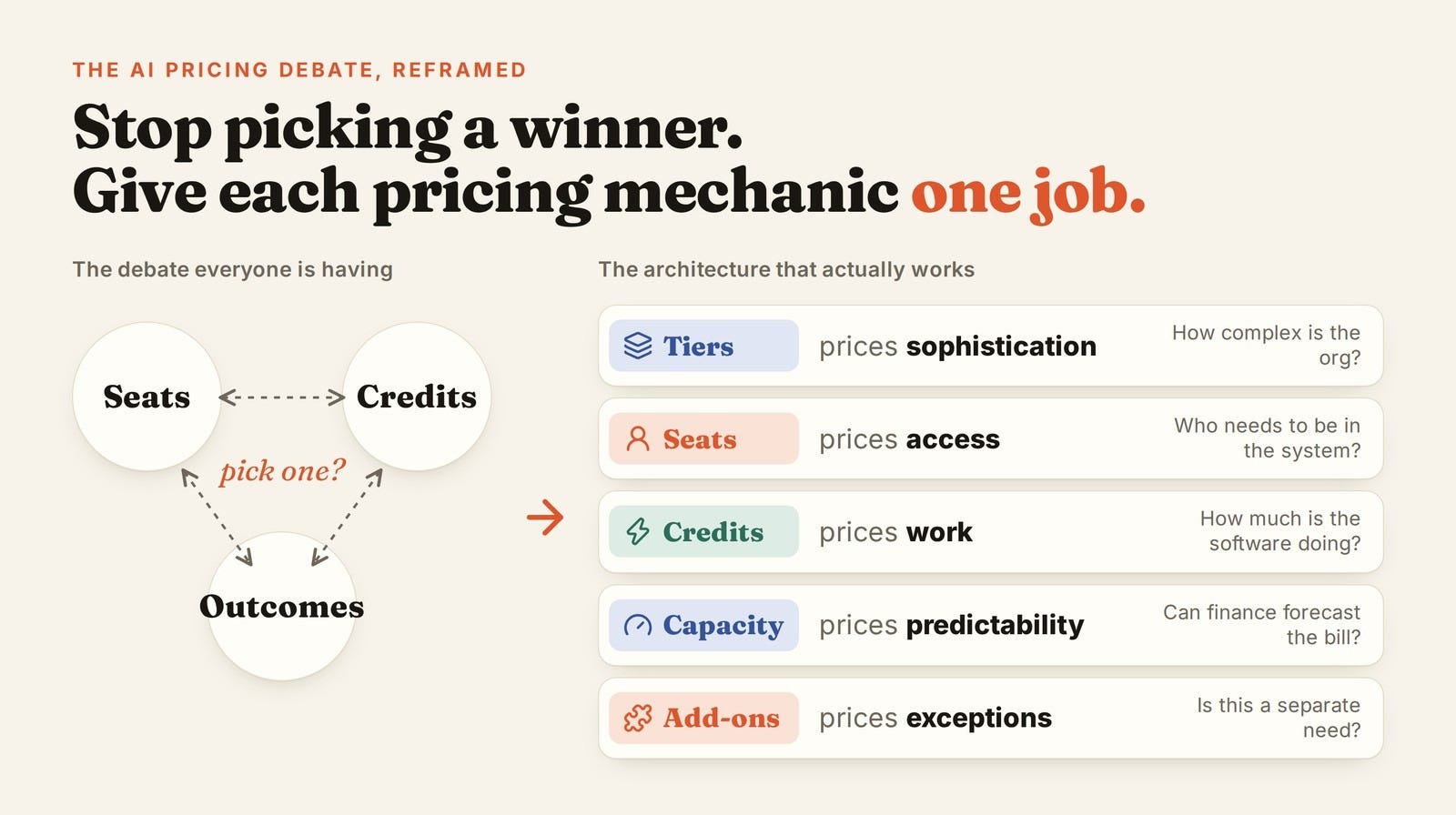
The AI pricing debate keeps searching for a winner: seats, credits, usage, or outcomes.
But look at what the market is actually doing. Salesforce supports multiple pricing models across Agentforce. Stripe’s own guidance describes hybrid pricing as common among AI leaders. HubSpot combines editions, seats, credits, and capacity.
The market may not be stuck between pricing models. It may be discovering that different pricing primitives monetize different forms of value.
That is not a failure to choose. It is an architecture.
Seats price access: who can enter the system, collaborate, configure it, supervise work, and use the core product. Usage prices work: how much variable activity is the software performing? Credits translate unlike workloads into one commercial currency. Capacity prices certainty when usage is variable but the buyer needs a predictable budget. Tiers price sophistication: which capabilities belong to increasingly complex organizations rather than increasingly active ones? Add-ons price genuine exceptions.
Each primitive gets one job.
The problem begins when one pricing primitive is forced to solve everything.
Per-seat pricing breaks when software starts doing more work without adding more people. Pure usage breaks when procurement cannot forecast spend. Outcome pricing breaks when attribution is messy or the vendor does not actually control the result. Credits break when customers cannot translate them into dollars and expected volume.
There is no universal winner because these models are solving different problems.
🔥 Insider Growth Playbook: The Pricing Decision Architecture Test
If you are redesigning pricing, start by asking how many decisions you are forcing the customer to make, and how confidently they can predict the result.
1. Map the Customer Workflow Before You Map the SKU
Take the five most important jobs customers perform in your product and trace each workflow end to end. Mark every place where the customer crosses a pricing boundary.
If a normal extension of the same job repeatedly triggers a new SKU, seat, or add-on, your packaging is probably reflecting your org chart more than the customer’s mental model.
Use the ticket-routing example as the test: would the customer consider this a new job, or the same job applied somewhere else?
2. Give Every Pricing Primitive One Job
Write down every mechanism you use: tier, seat, usage metric, credit, capacity pack, add-on, outcome fee.
Then finish this sentence for each one: We charge this way because…
If two mechanisms answer the same question, you may have redundancy. If one mechanism is trying to price access, usage, sophistication, scale, and value simultaneously, it is probably going to distort somewhere.
3. Run the CFO Test
Do not only test whether a customer understands your pricing. Test whether they can forecast it.
Give them three scenarios: a normal month, a growth month, and an outlier month. Can they calculate the bill without asking your sales team? Can they explain the range internally? Can they put a credible number into next year’s budget?
If not, the model is not simple enough, even if it only has one metric.
4. Fix Governance Before You Launch the New Model
Who can create a SKU? Who can introduce a new add-on? Who can move a feature from Starter to Professional? Who can decide that a new AI action consumes credits?
If the answer is effectively “the product team that owns it,” pricing debt will come back.
For meaningful changes, require a written case that covers the affected customer, revenue impact, expansion impact, accounting implications, sales implications, and the precedent the change creates.
The purpose is not bureaucracy. It is forcing a local pricing decision to survive a platform-level argument.
5. Calculate the Carrying Cost of Every Add-On
Do not evaluate an add-on only by ARR. Include engineering maintenance, entitlements, billing, sales training, documentation, support tickets, upgrade rules, migration work, and customer confusion.
Then ask whether the add-on would still exist if you had to build it again today.
A surprising number will not survive the test.
6. Stress-Test the Customers at the Edges
Model two customers: the smallest customer with enormous usage and the largest customer with surprisingly low usage.
Those cases will tell you whether your pricing metric is actually aligned with value or merely correlated with value for the average customer.
Every pricing model subsidizes someone. Know who.
7. Measure Decision Load
Give the pricing model to a new salesperson and a real prospect. Then ask each of them whether they can explain which edition they belong in, which users need which seat, what behavior changes the bill, what happens when usage spikes, what they buy next when they grow, and what the product will roughly cost twelve months from now.
If those answers require a pricing specialist, the architecture is still doing too much work in the buyer’s head.
Pricing Is a Product
Pricing and packaging is a product.
That means it deserves the same things we expect from any other product: a clear job to be done, a coherent information architecture, real user research, instrumentation, experiments, staged rollout, governance, and a willingness to reverse an elegant idea when customers cannot use it.
HubSpot’s new pricing is not interesting because it proves seats are dead. It does not prove credits are the future. It does not prove every company should have two seat types.
It is interesting because HubSpot appears to be separating several forms of value instead of pretending one metric can represent all of them.
The mistake would be to copy HubSpot’s exact prices, credit ratios, or seat definitions. The opportunity is to copy the architecture.
As AI takes on more work, more SaaS companies are going to hit the same problem HubSpot hit early: seats alone stop capturing value, pure usage becomes difficult to forecast, and layering new monetization on top of the old product structure creates a buying mess.
HubSpot’s answer is not one magical pricing metric. It is a system where each pricing mechanic has one job.
That is the part I would steal now.
Great pricing does not eliminate complexity. It decides who has to deal with it
The buyer should not have to understand your org chart, your entitlement system, your compute costs, or the internal debate about where a feature belongs.
That complexity belongs to you.
Want help applying this to your pricing or growth model?
Let’s talk
Was a blast getting to work on this with you Kunal!
HubSpot simplified how customers buy its complexity. It did not eliminate the complexity.
Like an HOA, they've simplified the brochure and membership options. The covenants are still 87 pages long. 😏