


👋 Hi, it’s Gaurav and Kunal, and welcome to the Insider Growth Group newsletter, our bi-weekly deep dive into the hidden playbooks behind tech’s fastest-growing companies.
Our mission is simple: We help you create a roadmap that boosts your key metrics, whether you’re launching a product from scratch or scaling an existing one.
What We Stand For
Actionable Insights: Our content is a no-fluff, practical blueprint you can implement today, featuring real-world examples of what works—and what doesn’t.
Vetted Expertise: We rely on insights from seasoned professionals who truly understand what it takes to scale a business.
Community Learning: Join our network of builders, sharers, and doers to exchange experiences, compare growth tactics, and level up together.
In the past year, companies like Klarna and Shopify made headlines by replacing large parts of their customer support teams with AI. But the backlash came quickly. Users felt abandoned, and internal teams felt undermined.
At LinkedIn, the approach is very different.
Instead of replacing agents, they’re scaling them.
Instead of removing the human touch, they’re using AI to deepen it.
The goal isn’t to deflect more tickets. It’s to transform support reps into trusted advisors. People who build relationships, surface upsell opportunities, and help users get the most out of LinkedIn’s Hiring product when engaging with customers.
A trusted advisor doesn’t just fix problems. They anticipate needs, offer proactive guidance, and create enough confidence that a customer is willing to pay a premium to work with them.
This matters even more at a company like LinkedIn, where trust is foundational to the brand and the Hiring product is used for critical business outcomes like filling roles, growing teams, and driving company growth. Customers aren’t just troubleshooting software — they’re making decisions that directly impact their ability to scale their company.
This post breaks down how LinkedIn rethought its support model using AI agents:
Agents that resolve common workflows from start to finish without human involvement
Agents that help reps evolve from copy-paste operators to advisors who can upsell and educate
Agents that free up team bandwidth so support becomes a growth function, not just a cost center
Agents that shift support upstream from a last resort when a user wants to churn, to catching users earlier when a customer is still open to learning, expanding, or re-engaging.
By rethinking not just what support does, but when it shows up, LinkedIn transformed it from a reactive cost into a proactive revenue driver.
Self-Serve Rate
Before we dive in, let’s define the KPI that keeps showing up in this post: self-serve rate.
Self Serve Rate = The percentage of users who engage with an AI agent or support agent and then return to the product without needing to escalate to another expert.
Sub-Metrics that roll up to Self Serve Rate:
AI Engagement Rate: % of users who interact with the agent when it's surfaced
Drop-Off After Engagement: % of users who abandon the session after talking to the agent (lower is better)
Return to Core Product Flow: % of users who complete or resume the task they were working on after AI engagement
Escalation Rate: % of conversations that still result in a human agent stepping in (lower is better)
Resolution Confirmation: % of AI interactions marked as “resolved” by the user (via feedback, survey, or inferred from behavior)
Repeat Contact Rate: % of users who return with the same issue within X days (higher repeat = lower quality self-serve)
Introducing

Jay is Group Product Manager at LinkedIn, where he leads AI strategy and execution across go-to-market products. He’s behind core initiatives like LinkedIn’s Virtual Chat Assistant and the GTM knowledge graph and Internal products for Reps, driving how AI agents scale support, sales, and onboarding. With deep experience in marketplaces and enterprise platforms, Jay is helping define what agentic workflows look like inside one of the world’s largest professional networks.

Jonathan is a Product Manager at LinkedIn focused on building AI agents that make go-to-market teams faster and more scalable. He led the development of LinkedIn’s multi-agent platform, GTM data graph, and Virtual Chat Assistant. His work blends AI, data, and product design to turn complex workflows into seamless, automated experiences.
Case Study #1: Reframing Support as a Value Moment, Not a Cancellation Trigger
Context:
Support at most companies has traditionally been buried in settings pages, billing menus, or at the bottom of help centers. By the time users reached out, they had often already made up their mind to cancel and were stuck.
That was exactly how LinkedIn’s Hiring product operated just a year ago. The chat function was hidden two or three layers deep, typically accessed only through billing, account settings, or subscription management.
These were low-leverage moments. The customer had already decided they weren’t getting value. Support was simply managing the exit.
Problem:
The support team noticed that too many of their conversations were reactive. Users came in already frustrated or ready to downgrade. And because of where the chat surfaced, it shaped the entire tone of the interaction.
Instead of asking:
“How do I get better candidates?”
They were asking:
“How do I cancel my plan?”
For LinkedIn, this was a missed opportunity especially for newer customers who hadn’t yet seen the full value of the Hiring tools. These users didn’t need a refund. They needed guidance.
New Solution:
The team redesigned where and how users encountered AI-powered support.
Chat was no longer buried in settings. Instead, it was surfaced throughout high-intent moments in the Hiring product:
On the homepage dashboard after logging in
Within the candidate search tool
On the job posting setup screen
On the main Help Center for Hiring Products
And on pages where usage dropped off, like InMail outreach or saved search alerts
Rather than waiting for the customer to disengage, AI agents were placed right at the decision point offering real-time help, education, and suggestions.
For example, a first-time recruiter at a mid-sized staffing firm looking to fill roles in the electric vehicle (EV) industry might ask:
“How do I get more qualified candidates for EV roles?”
The AI agent would respond with targeted suggestions, like:
“Try using the ‘green energy’ or ‘electric mobility’ skill filters”
“Here are 3 job descriptions that worked well for similar roles”
“You may want to expand your location radius to attract hybrid workers”
These were proactive, consultative responses that made the product feel smarter, and the user feel guided.
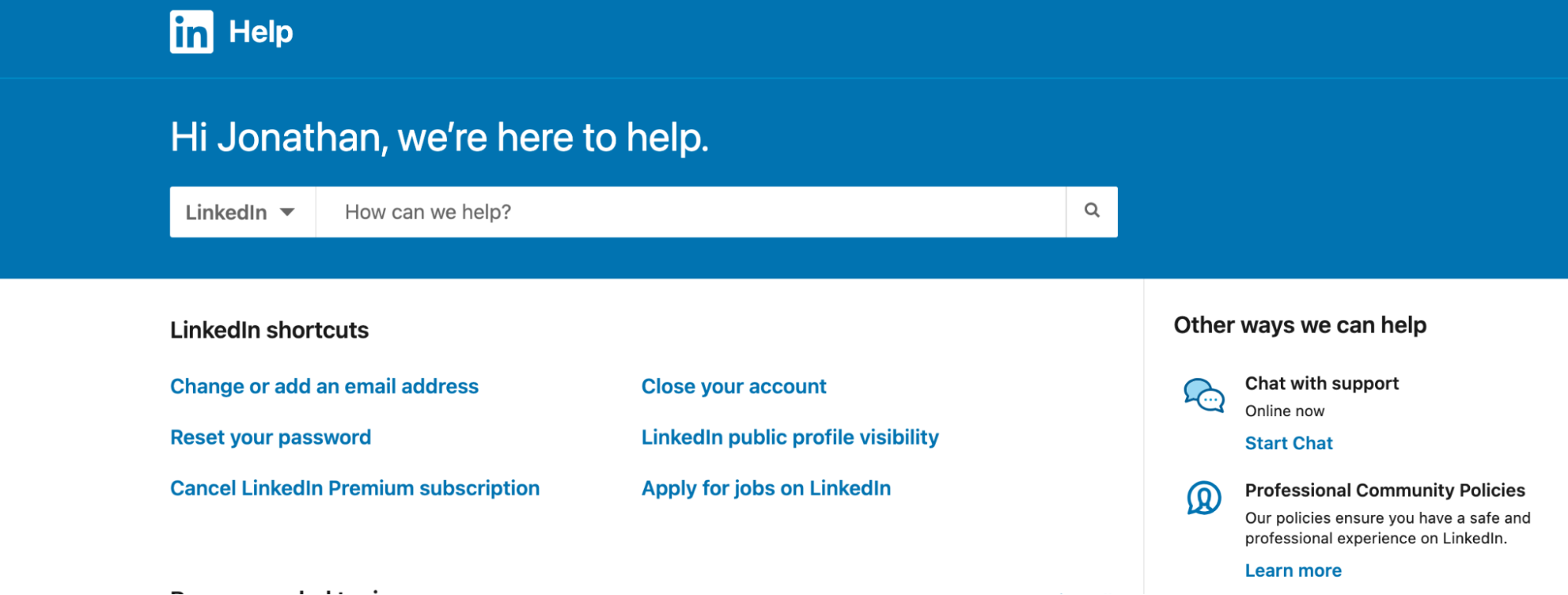
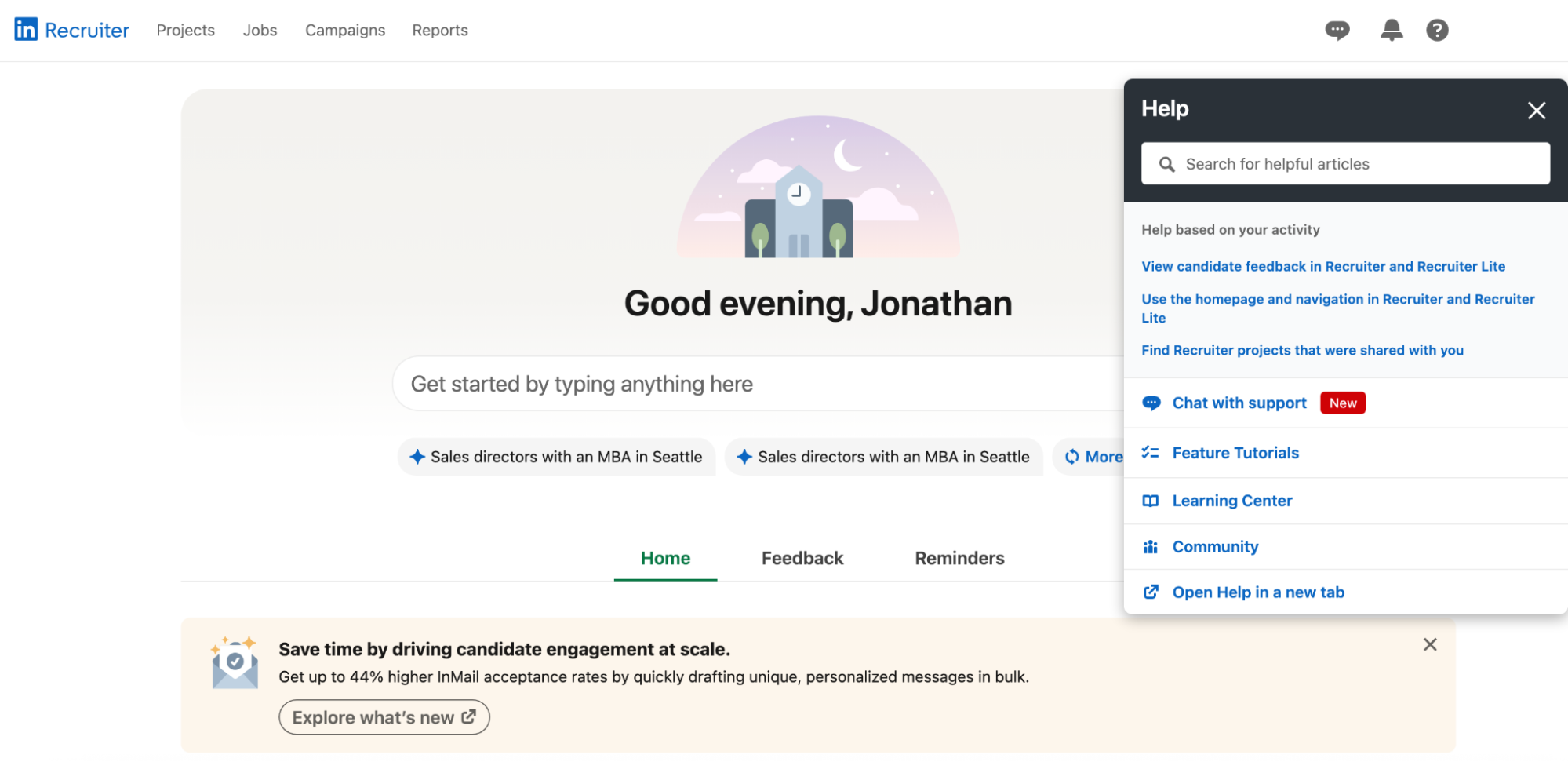
Chat surfaced in-product at key moments like job setup and search filters
Impact:
80% of customer questions are now resolved directly through chat, up from under 30% a year ago.
Self Serve rate increased to 65% overall from 0% a year ago.
Learnings:
Placement matters just as much as the agent itself. Putting support at the moment of curiosity instead of the moment of frustration dramatically improves tone and outcomes.
First-time users are the best audience for proactive support. They have a much higher learning curve and need even more guidance than your power users.
If you’ve gotten this far, you may be ready to navigate to the 🔥 section and check out our Playbook now.
Case Study #2: From Copy-Paste Agent to Trusted Advisor
Context:
LinkedIn’s Hiring support team was designed to help users quickly resolve issues. But that also meant support agents spent most of their time jumping between tools — searching knowledge base articles, copying content, drafting emails, and following up. It was execution-heavy work.
These were skilled team members, but they rarely had time to think beyond the task in front of them.
They were helping users reset passwords, but not asking if they were on the right plan.
They were fixing campaigns, but not suggesting how to improve performance.
Support was responsive, but not proactive.
Problem:
Support agents had little time to act like advisors. They were bogged down by manual tasks:
Searching for the right help article
Copying it into an email
Drafting a message
Sending it
Manually following up
Because of the workload, most interactions ended with solving the issue - not identifying expansion opportunities.
New Solution:
LinkedIn introduced AI sub-agents to automate the heavy lifting and free up reps to do higher-value work.
Each support agent was now paired with a series of purpose-built sub-agents that could:
Summarize the support request
Scan the full knowledge base instantly
Draft a personalized response email
Queue it for human review and send it
Instead of juggling tools, reps reviewed and personalized the response. With more time back, they could do something that wasn’t happening before: look deeper.
They started asking questions like:
“Is this customer actually on the right Hiring plan?”
“Have they activated the key features that drive performance?”
“Could they get better results on a different tier?”
One common example: A Paid user struggling to get candidate responses was automatically flagged for a product mismatch. The agent, now freed from execution work, could recommend moving to Recruiter Lite, explaining how additional InMail credits and smart targeting would improve their outreach.
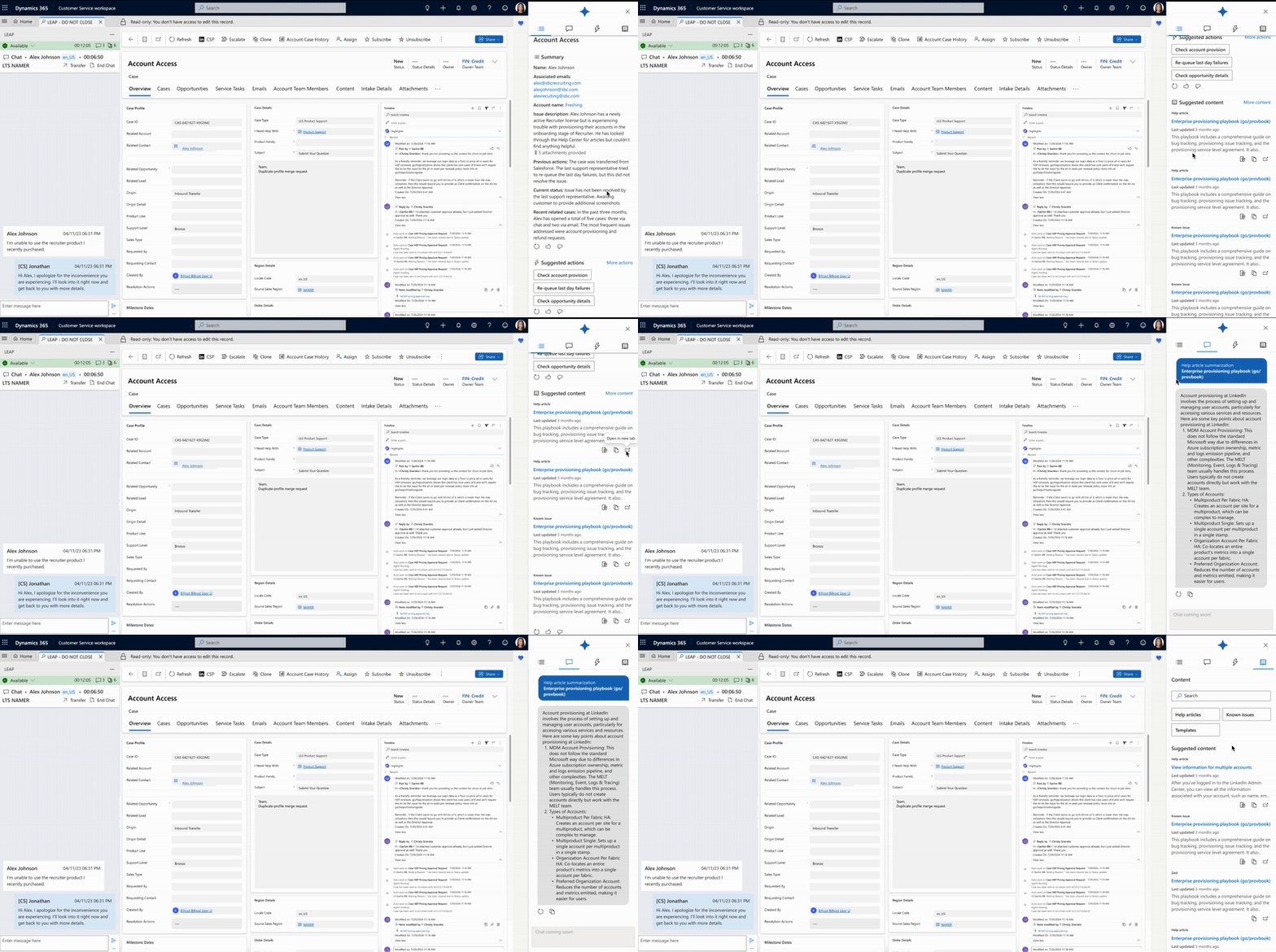
Sub-agent case summary → auto-drafted next steps → advisor review + share with customer
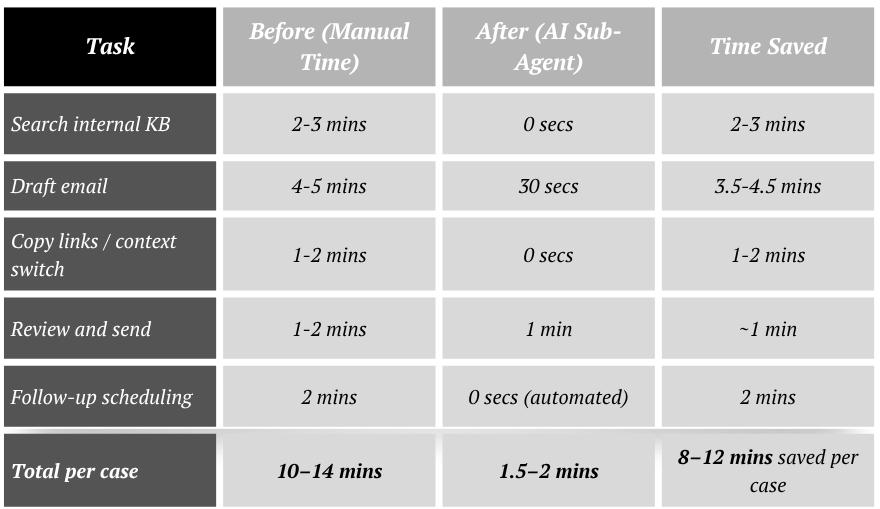
Impact:
Self Serve Rate increased by 15%+ by avoiding escalation to specialized reps for cases solved with AI as the AI Agent could now perform actions that would have needed escalating those cases.
Learnings:
Giving support teams AI-powered assistants removes low-leverage work and lets them act more like product consultants.
Upsells are much easier when reps aren’t stretched thin. They can actually spot the misalignment between a user's needs and their current plan.
Case Study #3: Making Every Rep a Subject Matter Expert
Context:
In many support teams, there’s always “that one rep” who knows how to handle the complicated cases the one others ping when they get stuck.
At LinkedIn, the Hiring support team saw this pattern regularly. Reps were constantly turning to peers for help on hard questions:
“Have you ever handled billing for a customer hiring in multiple countries?”
“What’s the right policy for InMail outreach to candidates in Germany under GDPR?”
“How do I explain Recruiter seat sharing rules for agencies with multiple brands?”
These weren’t simple knowledge base lookups. They required context, regulation awareness, and a deep understanding of LinkedIn’s product limitations, billing structure, and compliance policies.
This tribal knowledge slowed down resolution time, introduced inconsistency, and made scaling harder. Most of all, it created a ceiling on how confident any new rep could be.
Problem:
Reps spent too much time asking each other for help instead of resolving issues directly. Knowledge was trapped in Slack threads and institutional memory.
Even simple questions like “Can I use one Recruiter seat across two brands if the users work on different hiring pipelines?” could take 20 minutes to answer — with reps tracking down someone who’d “seen this one before.”
That limited both productivity and customer experience. It also made support too dependent on who was online and available to help.
New Solution:
LinkedIn rolled out AI agents designed specifically to surface expert-level responses and complete actions for complex, high-context workflows.
Instead of relying on peer support, reps could now query the AI directly inside their support console.
The system was trained on:
Historical rep responses to edge cases
Internal policy documentation
Billing rules by product tier and geography
Regulatory constraints like GDPR or Canadian anti-spam rules
For example:
When a customer asked how to run a Hiring campaign across Canada and the US using one contract, the AI pulled cross-border invoicing policies and generated a detailed response tailored to their tier and product configuration.
When asked if a customer could send InMails to candidates in the EU without consent, the AI flagged GDPR constraints and provided a compliant communication template.
When reps needed to know if billing addresses could be split across departments in a single enterprise account, the AI pulled relevant contract language and populated the appropriate form for submission.
And in high-confidence cases, it completed backend actions like updating contract details or making billing or credit card edits — directly through integrations with internal tools.
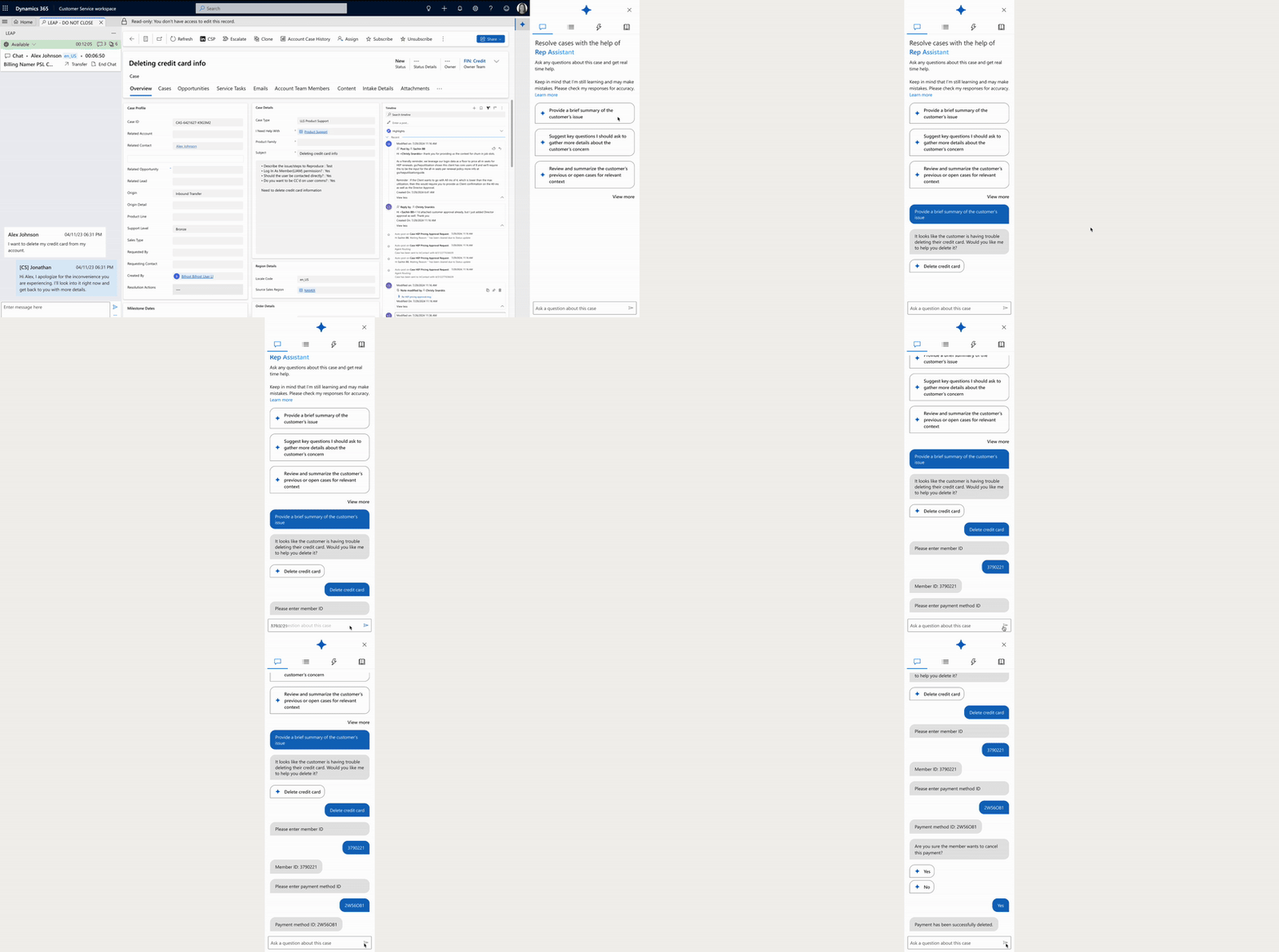
Rep → AI Agent → Get context on issue → Taking action on behalf of rep
Impact:
Internal rep-to-rep escalation requests fell by 20%, freeing up senior team members from repeat consulting.
Learnings:
AI doesn’t have to replace human reps. In this case, it made every rep stronger by embedding institutional knowledge into their workflow.
Most teams underestimate how much time is spent asking each other for help. Codifying that into an accessible AI layer unlocks scale.
AI makes it possible for reps to act like trusted advisors without needing deep industry knowledge. Instead of memorizing best practices for every vertical, reps can rely on AI to surface relevant insights and suggestions in real time.
🔥 Insider Growth Playbook: Designing Multi-Step AI Agents That Actually Take Action
Most teams use AI to generate content or answer questions. But the next wave of product innovation isn’t about sounding smart it’s about building agents that do real work inside your product.
Whether you're running a vertical SaaS platform, a marketplace, or a PLG product, this playbook walks through how to identify and design AI agents that own entire workflows, from input to execution.
Here’s how to find your first (or next) agent use case:
Step 1: List All User Workflows That Span 3+ Steps
Map your product’s top 15–20 user actions across core flows like onboarding, billing, usage, and account management.
Look for:
Repetitive processes
Flows with structured inputs + logic-based decisions
Work that users currently stall on or abandon midway
Examples:
Submitting a compliance document
Migrating data from another tool
Setting up hiring campaigns across multiple geos
Requesting financing or issuing a payout
Step 2: Flag the Ones With Friction, Drop-Off, or Back-and-Forth
Good agent candidates are workflows where:
Users frequently bounce or get confused
The task spans multiple tabs, systems, or approvals
Users say, “I wish someone could just do this for me”
Step 3: Identify What the Agent Needs to Do (Not Just Say)
Ask: if an AI agent owned this workflow, what would it do?
Not just:
“Here's how to set up a campaign”
But:
“I’ve launched the campaign for you based on your past behavior, budget, and region. Here's what to review.”
Break down the agent's job:
Interpret intent
Collect missing inputs
Trigger backend actions
Generate outputs
Confirm status and success
Step 4: Segment Workflows Into 3 Types
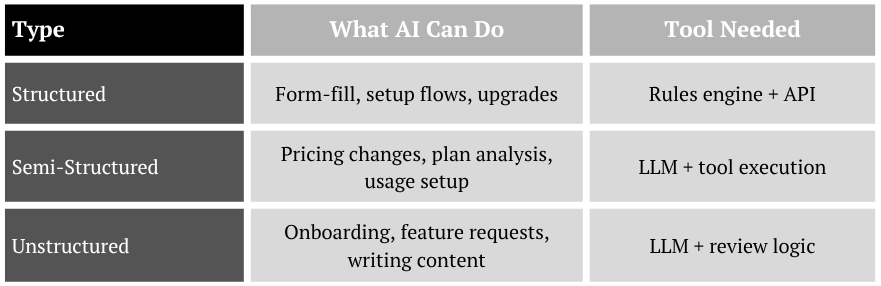
Focus your agent roadmap on structured and semi-structured work first.
Step 5: Find Data Bottlenecks and Breakpoints
Workflows break when:
Users don’t know what to input
They need to switch between systems
You rely on humans to approve or push buttons
A great agent bridges those breaks:
“I’ve found 3 files missing from your last import. Would you like me to reprocess them?”
“Your invoice failed because the address format is invalid. I’ve fixed it based on your previous entries.”
Step 6: Score Each Candidate Workflow by Impact
Use a quick prioritization matrix:
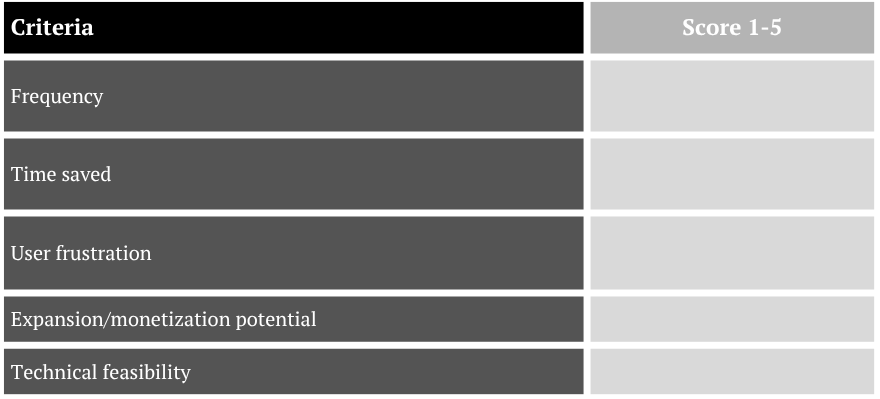
Step 7: Design the Agent Like a PM — Not a Bot
Your agent is a new product experience. Treat it like a feature:
What’s the entry point?
What does the user see, say, or do?
How do you handle fallback?
How do you log actions and show transparency?
Think: trust, control, outcome.
Step 8: Build for Action First, Intelligence Second
You don’t need an LLM to start. Some of the highest-impact agents are:
Auto-form fillers
Plan switchers
Config checkers
Reminder or reschedule triggers
You can always layer in natural language or reasoning logic later. But start with delivering results.
If you’re thinking about where to start or how to go from prototype to production, we’ve helped teams build AI agents that handle everything from onboarding flows to billing automation.
Whether you're scoping your first agent or expanding to new workflows, we can help you:
Identify high-leverage use cases
Design multi-step agents that work across tools
Build guardrails and fallback logic
Track business impact beyond just deflection
Need help designing or implementing AI agents in your product?
Reach out. We’re happy to help.
Talk to us.